What Is HRMS? Full Form, Features and How It Differs From an ATS
 Devansh Dhawan
 ·Nov 18, 2026·8 min read

Key Takeaways
- 1HRMS stands for Human Resource Management System, the software that holds employee records and runs payroll, attendance, leave, performance and compliance for people already on the payroll.
- 2An ATS manages candidates before the offer, while an HRMS manages employees after joining. The handoff happens at the offer and the joining date.
- 3India's four labour codes took effect on 21 November 2025, per the Press Information Bureau, with mandatory appointment letters and timely wages that an HRMS must track.
- 4An HRMS recruitment module covers basic job posting and applicant tracking, but high-volume or multi-channel hiring usually needs a dedicated recruiting platform.
- 5Decide by counting: employee records, payroll runs and statutory filings point to an HRMS, while open roles, applicants and offers point to an ATS or recruiting platform.
HRMS stands for Human Resource Management System. It is software that stores employee records and runs the day-to-day work of managing people already on the payroll, such as payroll, attendance, leave, performance and compliance. An HRMS starts where hiring ends, which is why it is often confused with an applicant tracking system (ATS).
If you are asking what is HRMS, this guide answers it module by module. It then explains the HRMS portal and HRMS ID that employees see at work, and how an HRMS differs from an ATS. It also shows where an HRMS recruitment module stops and how the two systems hand over data when a candidate joins.
Hiring more people than your tools can follow up with? See how HireBound reaches and screens candidates before they reach your HRMS →
What Is HRMS? Meaning and Full Form
The full form of HRMS is Human Resource Management System. You will also see the HRMS full form written as Human Resources Management System. Both mean the same thing.
In plain terms, the HRMS meaning is a single system of record for employees. It keeps each person's details, pay, attendance and leave history in one place. HR, finance, managers and employees all work from the same data instead of separate spreadsheets.
An HRMS serves a person from their first day to their last. It is built for the employment relationship: contracts, salaries, shifts, appraisals, exits. It is not built for strangers who have not yet applied or accepted an offer.
What Is HRMS Software and What Does It Do?
HRMS software is the application that delivers those functions, usually on a cloud subscription with a web portal and a mobile app. Vendors package it as a set of modules. Many Indian HR teams start with payroll and attendance and add the rest later.
These are the modules most HR teams expect to find:
- Employee records. A profile per employee with personal details, documents, job history, bank details and reporting line. This is the core, and every other module reads from it.
- Payroll. Monthly salary calculation, deductions and payslips. In India this includes Provident Fund, ESIC, professional tax and income tax deducted at source.
- Attendance and leave. Clock-in records, shift rosters, leave balances and approvals. Attendance feeds payroll, so errors here become pay errors.
- Performance. Goal setting, review cycles, feedback and appraisal records, which later inform increments and promotions.
- Onboarding. Joining forms, document collection, asset allocation and first-week tasks for a person who has accepted an offer.
- Compliance. Statutory registers, filings, retention of records and audit trails.
India makes the compliance module matter more than most. The Press Information Bureau announced on 21 November 2025 that the four labour codes took effect, rationalising 29 central labour laws. The release lists mandatory appointment letters for all workers and timely payment of wages among the changes.
An HRMS is where those obligations get tracked month after month. State and central rules under the codes can differ in detail, so check with your payroll or legal team before you change a process.
The diagram below shows the six modules around the employee record.
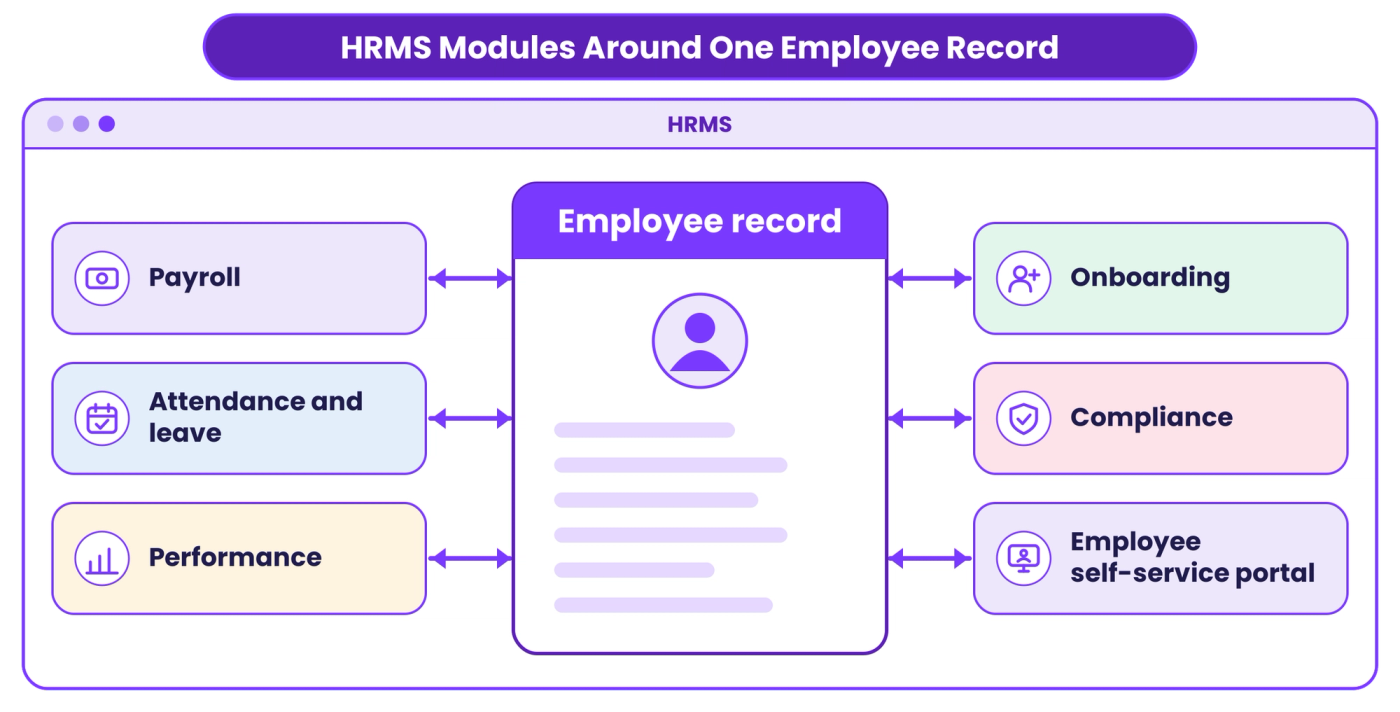
Every module reads from one employee record, which is why a change in one place shows up everywhere.
What Is an HRMS Portal and an HRMS ID?
An HRMS portal is the web or mobile front end of an HRMS that employees use themselves. Through it they view payslips, apply for leave, mark attendance, update personal details and download letters. HR teams and managers use a different view of the same portal to approve requests and run reports.
An HRMS ID is the identifier tied to your record in that system. It is often your employee code or a username issued by HR when you join. It links your attendance, leave and pay data to you.
You will see the term outside private companies too. Many Indian government departments, railways and public-sector banks run their own HRMS portals for service records, leave and transfers. For access or password problems, ask your own HR or IT team, because each organisation sets its own rules.
HRMS vs HRIS vs HCM: What Is the Difference?
The three terms overlap, and vendors use them loosely. A rough guide helps you read product pages.
An HRIS (human resource information system) is the narrowest. It focuses on storing and reporting employee data. An HRMS usually adds payroll, time and attendance, and performance on top of that record. HCM (human capital management) is the broadest label and tends to include talent acquisition, learning and workforce planning as well.
None of these is a regulated category, so check what a product includes rather than trusting the label. Two products both called HRMS can differ a lot. Ask for the module list and ask which modules are included out of the box.
HRMS vs ATS: How Do They Differ?
An HRMS manages employees after they join, while an ATS manages candidates before they do. Every other difference follows from the stage of the employee lifecycle each system covers.
An ATS tracks job openings, applications, interview stages and offers. Our guide to what an applicant tracking system is covers that side in detail. The table compares the two systems on the points that matter when you are deciding what to buy or fix.
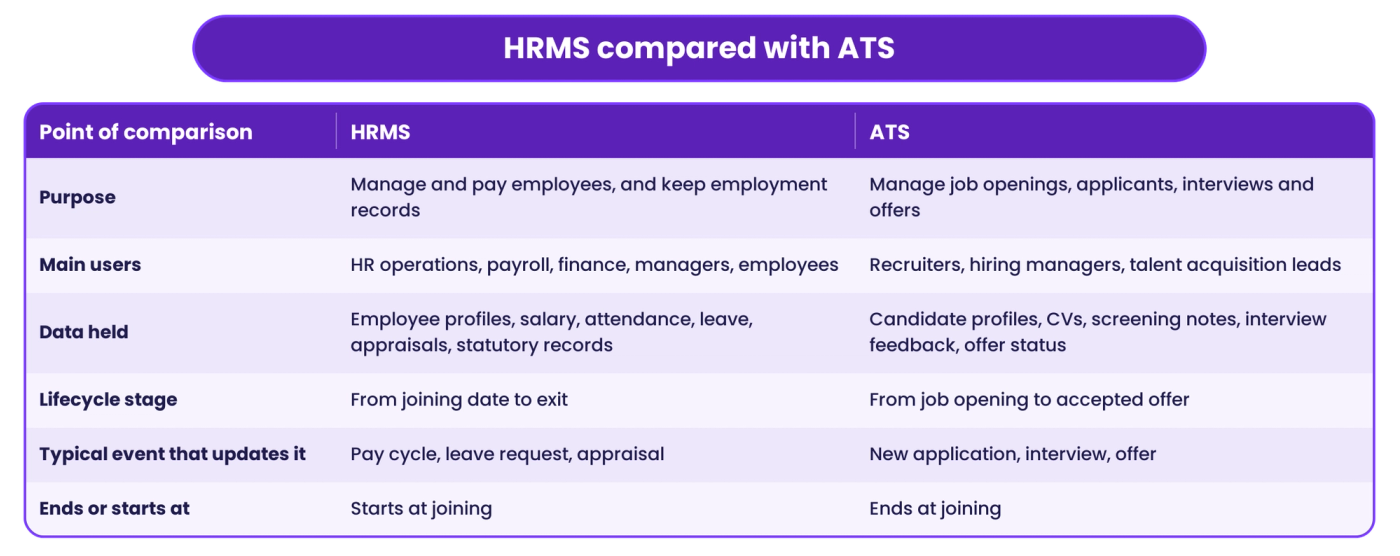
Read the last row as the handoff. The ATS ends when a candidate becomes an employee, and that is the moment the HRMS record begins.
Where Does an HRMS Recruitment Module Stop?
Many HRMS products include a recruitment module. It usually lets you post a job, collect applications, move candidates through a few stages and issue an offer. For a company hiring a handful of people a quarter, that can be enough.
The limits show up with volume and reach. A built-in module generally tracks applications that arrive. It does not usually go out and find candidates, message them on WhatsApp, run screening calls in regional languages or rank hundreds of applicants against a role. Teams that hire in bulk, or fill roles where candidates rarely check email, feel this first.
A dedicated recruiting platform covers that front end: sourcing, outreach, screening, scheduling and the pipeline. If you are weighing it against a recruiting CRM too, our comparison of recruitment CRM vs ATS explains how those two differ.
This is where HireBound sits. Its permanent hiring platform handles the stages before the offer, from candidate discovery through screening and scheduling, and it is built to work alongside the systems you already run. The HRMS stays the record for people once they join.
How Do an HRMS and a Recruiting Platform Connect?
They connect at two points: the accepted offer and the joining date. The recruiting side passes over what the employee record needs. The HRMS then owns it.
A practical sequence looks like this:
- Offer accepted. The recruiting system marks the candidate as hired and holds the agreed role, salary, joining date and location.
- Pre-joining. Documents such as identity proof, address proof, education and previous employment papers are collected. This can be done in the recruiting system or in the HRMS onboarding module, but it should happen once, not twice.
- Record creation. HR creates the employee profile in the HRMS, either by manual entry, a file upload or an integration, and issues the employee code.
- Joining. Payroll, attendance and leave start from the joining date, and the appointment letter is on file.
Step 3 is a common source of data errors, because someone retypes candidate details by hand. A wrong bank account number or joining date becomes a payroll problem a month later. Whether you automate the transfer or not, agree which system is the source of truth for each field.
Tools that do not talk to each other also carry a cost beyond typos. Our piece on the cost of fragmented recruiting tools looks at what recruiters lose to switching between systems.
How Do You Decide What You Need?
Count what you manage, then match the system to the stage. If your pain is employee records, payroll runs and statutory filings, you need an HRMS. If it is open roles, applicant volume and offers that stall, you need an ATS or recruiting platform.
Most growing companies end up with both. A simple order of operations works for many Indian teams:
- Start with payroll, attendance and records, because errors there carry legal and morale costs.
- Add recruiting tools when roles open faster than your team can follow up.
- Connect the two at offer and joining, so a hire is entered once.
The diagram below turns that into a quick decision path.
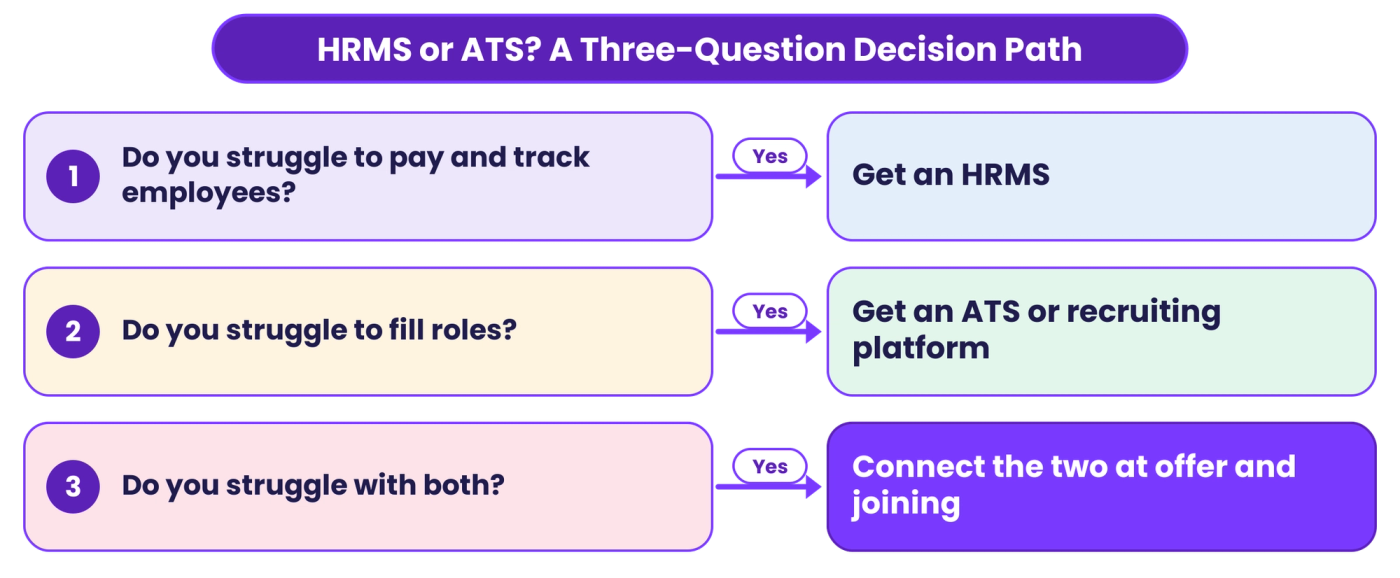
Match the tool to the stage where your team loses time, and connect the two where the candidate becomes an employee.
One caution. Do not buy an HRMS to fix a hiring problem, or the other way round. A recruitment module inside an HRMS will not fix slow candidate response, and a recruiting platform will not run your payroll.
Hiring for permanent roles and want candidates screened before they reach your HR team? Talk to HireBound about your hiring workflow →
Conclusion: A Decision Rule for HRMS vs ATS
HRMS means Human Resource Management System: the system of record for employees after they join. An ATS or recruiting platform handles candidates before they do.
If you pay and manage people, you need an HRMS. If you struggle to find and screen them, you need a recruiting platform. Connect the two at the offer, and enter each hire once.


