Boolean Search for Recruiters: Strings You Can Copy
 Tanmey Goswami
 ·Nov 13, 2026·10 min read

Key Takeaways
- 1Six operators do most of the work in Boolean search for recruiters: AND, OR, NOT (or minus), quotes, parentheses and the wildcard.
- 2Google treats parentheses as invisible, according to Daniel M. Russell's Advanced Search Operators guide (updated 2024), so keep OR groups to single words or quoted phrases.
- 3Write location and notice-period terms both ways for India, such as Bengaluru OR Bangalore and "immediate joiner" OR "serving notice".
- 4Boolean finds exact words but cannot rank fit. HireBound's AI sourcing searches 500M+ profiles and explains each match in plain English.
- 5Test every string on the first 20 results and change one operator at a time, so you can see which edit helped.
Boolean search for recruiters is a way of combining keywords with operators such as AND, OR and NOT to find candidates in a database, job board or search engine. A good string pulls in every useful variation of a job title or skill and leaves out the noise. It turns a list of thousands into a few dozen profiles worth reading.
This guide explains each operator, shows how X-ray search works on Google, and gives you strings to copy for engineering, sales, healthcare, finance and India hiring. Each string sits on its own line. Copy it, swap in your role and location, and run it.
Spending hours on search strings for every role? See how HireBound finds and ranks candidates for you →
What Is Boolean Search in Recruiting?
Boolean search is named after George Boole, the 19th-century mathematician behind this logic. In recruiting, it means telling a search box exactly which words must appear, which can stand in for each other, and which must not appear.
Recruiters use it in three places:
- Your ATS or candidate database, to find past applicants before you post a job.
- Job-board resume databases, which usually accept full Boolean syntax.
- Google and other search engines, through X-ray search, which looks inside one website at a time.
SHRM's 2026 Recruiting Executives Benchmarking puts the median time-to-fill at 39 days for nonexecutive roles. A tested string you can reuse saves sourcing time on every similar role that opens after it.
Boolean Operators Explained
Six operators cover almost every string in this guide. The table shows what each does and how Google handles it compared with most ATS and job-board searches.
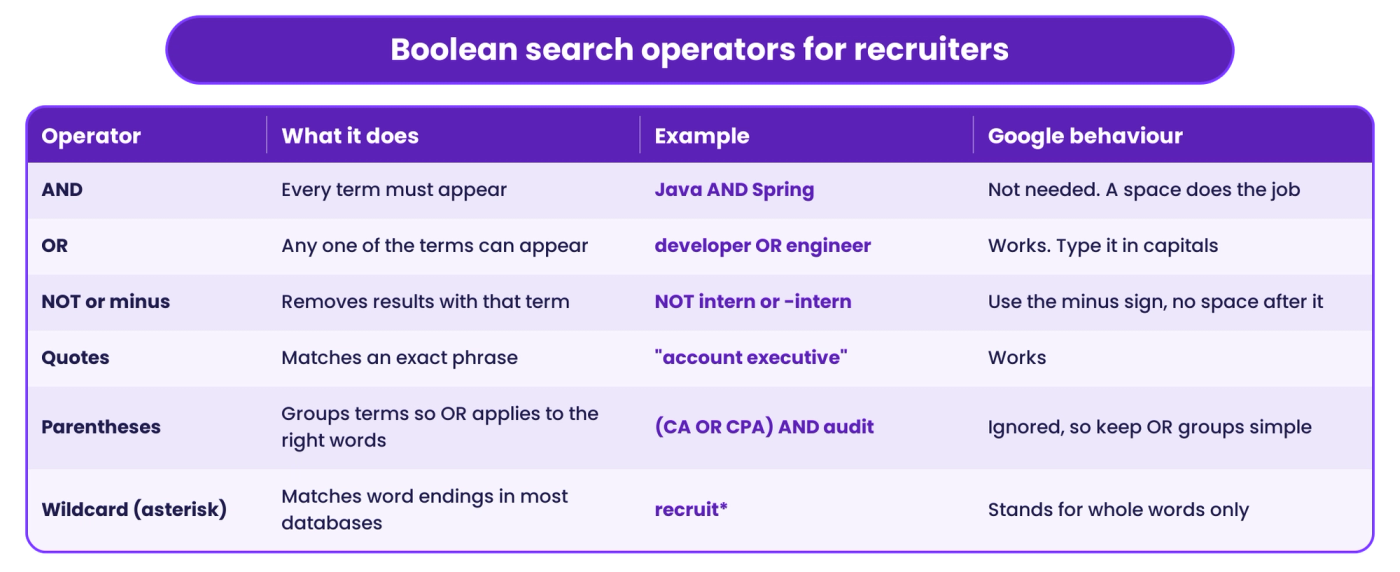
When a string returns odd results, check the parentheses and capitals first.
AND
AND narrows a search. "Python AND Django" returns only profiles that mention both. Google does not document AND as an operator, so leave it out there and let the space between words do the work.
OR
OR widens a search to cover the titles and spellings different people use for the same work, such as "product manager", "product owner" and "PM". Write OR in capitals, because Google reads a lowercase "or" as an ordinary word.
NOT and the Minus Sign
NOT removes results that contain a term. Most databases accept NOT, and Google uses a minus sign placed directly before the word, as in -intern. Use it sparingly. Every exclusion also removes good candidates who mention that word in passing.
Quotation Marks
Quotes force an exact phrase. Without them, "customer success manager" can match a profile that says "manager" in one job and "customer" in another. Google's own guide to search operators lists quotes, site:, the minus sign and filetype: among the operators it supports.
Parentheses
Parentheses tell an ATS which terms belong together. "(CA OR CPA) AND audit" means one of the two qualifications plus audit experience. Google is different. Daniel M. Russell's Advanced Search Operators guide, updated in February 2024, says Google does not see parentheses at all. On Google, write each OR group as single words or quoted phrases so the grouping does not matter.
Wildcards and Truncation
An asterisk at the end of a word root, such as recruit*, finds recruiter, recruiters and recruiting in most ATS and job-board searches. Some tools use a different symbol, so check the help page. On Google, the asterisk stands in for a whole missing word inside a phrase, not the end of a word, so type out the variants instead.
How Do You Build a Boolean Search String?
Start with the job itself, then add operators. Build the string in this order:
- List the titles. Write every title someone doing this job might use, including older and more junior versions. Join them with OR inside one group.
- Pick the two or three skills that matter most. Ignore nice-to-haves. Each extra AND cuts results a lot.
- Add synonyms for each skill. Kubernetes OR k8s, JavaScript OR JS. Put each skill's synonyms in their own OR group.
- Add location. Include alternate city names and nearby areas.
- Exclude only what you see. Run the string first. Add NOT terms only for noise that shows up in the results.
- Test on the first 20 results. If fewer than half fit, change one operator and rerun, so you can see which edit helped.
X-Ray Search: Using site:, intitle:, inurl: and filetype:
X-ray search uses Google to look inside one website, or one type of page, such as public profiles or PDF resumes. Four operators do the work:
- site: limits results to one domain, such as site:github.com.
- intitle: requires a word in the page title, such as intitle:resume.
- inurl: requires a word in the web address, such as inurl:cv.
- filetype: finds documents of one type, such as filetype:pdf for resumes.
Two cautions apply. Google's Search Central page on the site: operator says it does not necessarily return every indexed page. Russell's guide notes that intitle: and inurl: apply only to the word straight after them. So treat X-ray results as a sample of what exists, and put the operator in front of each word you want it to cover.
The same site: approach works on any public profile or portfolio site. Swap in the domain and keep the rest of the string.
Boolean Search Strings for Engineering Roles
Engineers rarely write their profiles around a job title. They list languages, frameworks and projects. Lead with skills and use a broad title group.
Backend engineer, ATS or job board:
("backend engineer" OR "backend developer" OR "software engineer" OR "SDE") AND (Golang OR Go) AND (Kubernetes OR k8s OR Docker) NOT (intern OR trainee)
Frontend developer with a wildcard, ATS or job board:
("frontend" OR "front-end" OR "UI engineer") AND (React OR "React.js" OR ReactJS) AND (TypeScript OR JavaScript) AND develop*
Data engineer, ATS or job board:
("data engineer" OR "big data engineer" OR "ETL developer") AND (Spark OR PySpark OR Databricks) AND (Airflow OR dbt) AND (AWS OR GCP OR Azure)
GitHub X-ray, Google:
site:github.com "Bengaluru" Golang OR Rust "followers" -jobs
The diagram below breaks the backend string into its parts.
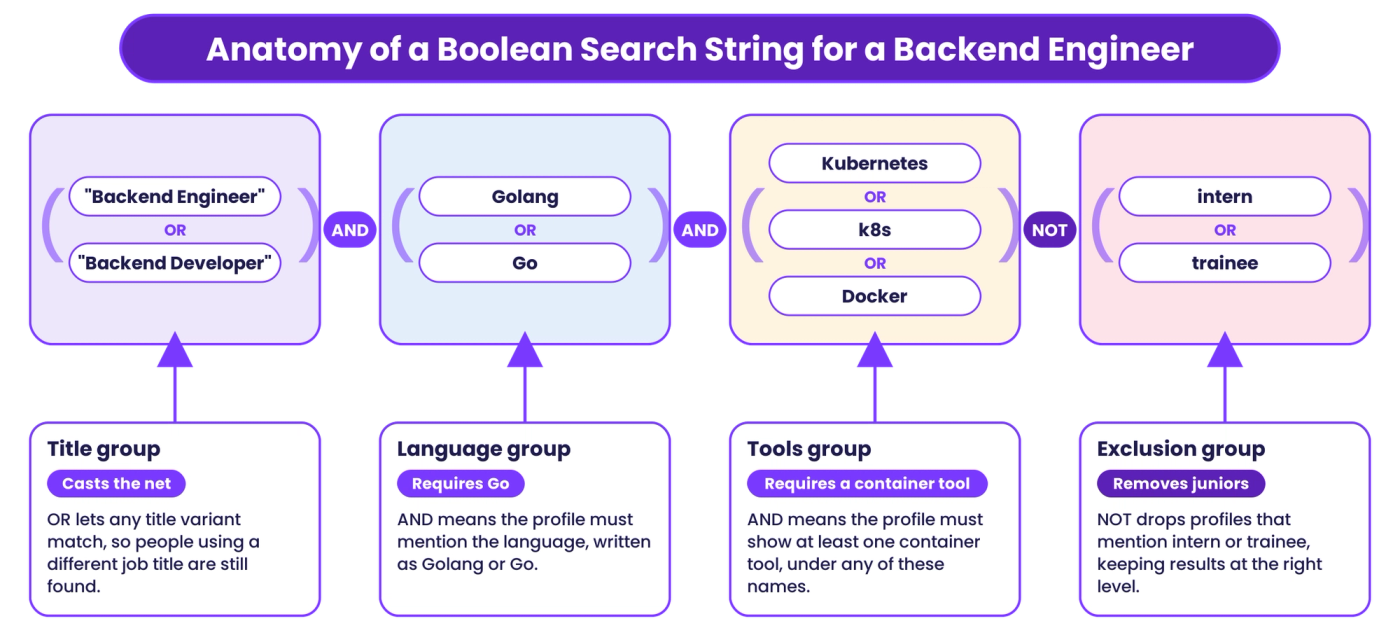
Read any string you copy left to right in the same way: titles, then must-have skills, then exclusions.
Boolean Search Strings for Sales Roles
Sales titles change from company to company, so cover them widely. Then narrow on the market and the numbers that prove performance.
SaaS account executive, ATS or job board:
("account executive" OR "AE" OR "account manager" OR "enterprise sales") AND (SaaS OR "software sales") AND (quota OR "quota attainment" OR "% of target") NOT (intern OR "inside sales trainee")
Resume X-ray for sales, Google:
intitle:resume OR intitle:cv "account executive" "SaaS" "quota" -jobs -template -sample
Field sales in India, ATS or job board:
("area sales manager" OR "ASM" OR "territory sales manager" OR "sales officer") AND (FMCG OR "consumer durables") AND (Lucknow OR Kanpur OR Varanasi)
Keep the -template and -sample exclusions in sales X-ray strings. Without them, resume-writing sites fill the first page of results.
Boolean Search Strings for Healthcare Roles
Healthcare searches depend on credentials, units and shift patterns. Abbreviations are common, so pair every abbreviation with its full form.
ICU nurse, ATS or job board:
("registered nurse" OR "RN" OR "staff nurse") AND (ICU OR "intensive care" OR "critical care") AND (BLS OR ACLS)
Medical coder, ATS or job board:
("medical coder" OR "coding specialist" OR "HIM coder") AND (CPC OR CCS OR "certified professional coder") AND (ICD-10 OR "ICD 10")
Nurse resume X-ray in India, Google:
intitle:resume "staff nurse" "GNM" OR "B.Sc Nursing" "Kerala" filetype:pdf
A string only finds what a candidate wrote, so confirm licences and registrations with the issuing body before an offer.
Boolean Search Strings for India: Cities, Notice Period and CTC
Indian profiles add two problems. City names have more than one spelling, and candidates write their notice period in many ways. Cover both, or you lose candidates who wrote "Bangalore" when you searched "Bengaluru".
Location group for India:
(Bengaluru OR Bangalore OR "Electronic City" OR Whitefield) OR (Gurugram OR Gurgaon OR Noida OR "Delhi NCR")
Short notice period:
("immediate joiner" OR "immediately available" OR "serving notice" OR "notice period 15 days" OR "notice period 30 days" OR "LWD")
Full string, Java developer in Bengaluru who can join quickly:
("java developer" OR "java engineer" OR "backend developer") AND ("Spring Boot" OR Microservices) AND (Bengaluru OR Bangalore) AND ("immediate joiner" OR "serving notice" OR "notice period 30 days")
CTC and experience terms:
("current CTC" OR "expected CTC" OR "CTC") AND ("4 years" OR "5 years" OR "4+ years" OR "5+ years")
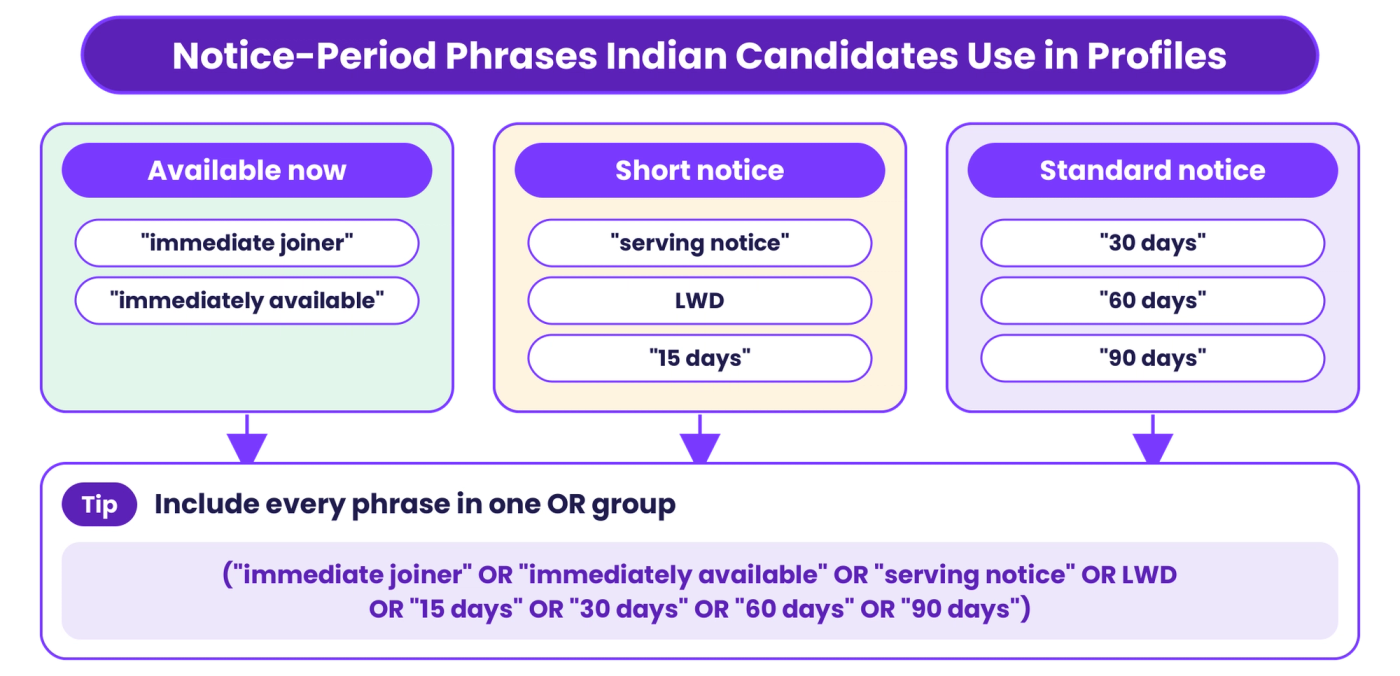
Long notice periods are common in Indian tech hiring, so a string that finds short-notice candidates can bring the start date forward by weeks.
Boolean Search Strings for Finance Roles
Finance roles turn on qualifications and standards: CA, CPA, CFA, IFRS, Ind AS, GAAP. Put each family of credentials in its own OR group so one missing word does not drop a strong profile.
Financial analyst or FP&A, ATS or job board:
("financial analyst" OR "FP&A analyst" OR "finance business partner") AND (budgeting OR forecasting OR "variance analysis") AND (Excel OR "Power BI" OR SQL)
Chartered accountant with audit experience, ATS or job board:
("chartered accountant" OR "CA" OR "CPA" OR "ACCA") AND (audit OR "statutory audit" OR "internal audit") AND ("Ind AS" OR IFRS OR GAAP) NOT (articleship OR "CA inter")
Finance resume X-ray, Google:
intitle:resume OR intitle:cv "CFA" "equity research" "Mumbai" -jobs -course
The NOT terms in the CA string remove students still in training, who often use the same keywords as qualified CAs.
Common Boolean Search Mistakes
Most failed strings break in one of these ways.
- Lowercase operators. "or" and "and" in lowercase are read as plain words on Google and in many tools. Type AND, OR and NOT in capitals.
- Missing quotes on phrases. Without quotes, "project manager" matches any page with both words anywhere.
- Too many AND terms. Each AND cuts results, and a long list of required skills mostly finds people who stuffed their profiles with keywords.
- Too few OR terms. Searching one job title misses everyone who uses another. Most roles need several title variants.
- Over-excluding. -manager removes engineers who mention their manager. Exclude only noise you have seen in the results.
- Smart quotes from Word or email. Curly quotation marks pasted from a document can break a string. Type straight quotes in the search box.
- Relying on parentheses in Google. Google ignores them, so a complex nested string behaves differently there than in your ATS.
- Never updating the string. Skills and titles change, so review saved strings each quarter.
Where Boolean Search Stops Working
Boolean search matches the exact words you type, so a few limits remain however carefully you build the string.
- It misses unstated skills. A data engineer who built pipelines at scale may never write "Airflow". A keyword string skips them.
- It cannot rank. Every result matches equally, so you still read every profile to find the best few.
- It cannot explain fit. A match shows that a word appeared, with no sign of whether the candidate did the work at the right level.
- It does not scale across roles. Every open role needs its own tested string, and each one goes stale.
This is where AI or semantic search takes over. It reads a role brief and each profile for meaning, then ranks candidates by fit. The table shows where each method is stronger.
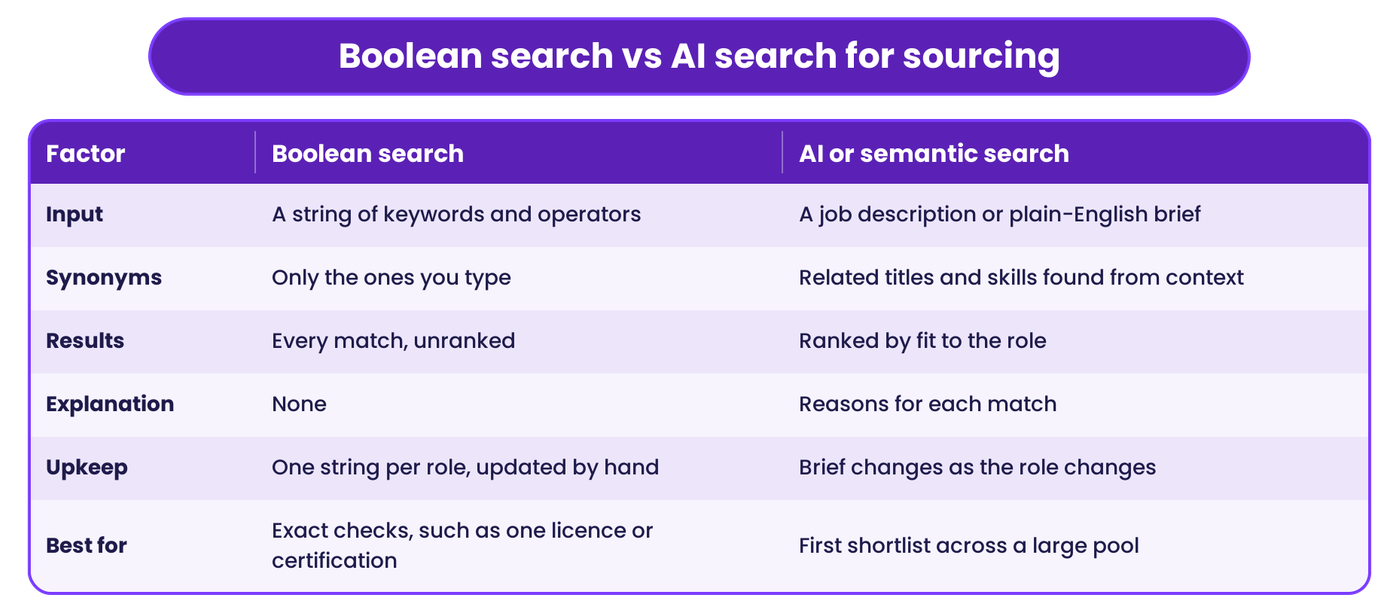
Use AI search to build the first shortlist, then Boolean to check one hard requirement across it.
How HireBound's AI Sourcing Picks Up Where Boolean Stops
HireBound's AI Discovery starts from the job description or a plain-language brief. It pulls out the search parameters, then searches 500M+ profiles across job boards, professional sources and your own candidate pool. You refine skills, seniority, location and notice period in plain English rather than rewriting operators.
Each candidate on the ranked shortlist comes with a match score, strengths, concerns and a plain-English reason for the match. Recruiters can see why someone ranked where they did, which a Boolean result cannot show. HireBound's AI candidate sourcing also rediscovers past applicants in your internal pool before it searches outside, so people you already attracted once get a second look.
From the shortlist, recruiters can save candidates, message them or push them to the ATS. In India, outreach usually goes on WhatsApp first. HireBound data shows a 64% WhatsApp response rate against about 12% for email. Recruiters still decide who moves forward.
For the full workflow from job description to ranked list, read our guide to AI candidate search. If your hard-to-fill roles depend on people who are not job hunting, our passive candidate sourcing guide covers how to find and approach them.
Want a ranked shortlist without writing a single string? Talk to the HireBound team →
Keep a String Library Anyway
Boolean search stays useful alongside AI sourcing. Keep a shared library of tested strings by role family, noting the database each was built for, and use it for exact checks and quick X-ray searches.


