Change Management for AI Recruiting Rollouts: Getting Recruiters to Actually Adopt the Tool
 Devansh Dhawan
 ·Oct 11, 2026·12 min read
Key Takeaways
- 1Change programs often fall short of their goals, and AI recruiting rollouts are no exception unless someone owns adoption from the start.
- 2Gartner found 37% of employees skip AI tools they can use because their co-workers are not using them, so peer behaviour drives adoption more than training does.
- 3Recruiters resist tools that threaten their expertise or add work in week one, so start with the most tedious task and show the time it gives back.
- 4A four-week plan works: pilot with a small group, fix friction, widen access, then set standards. Never announce a full rollout on day one.
- 5Track weekly active use, tasks completed in the tool and time saved. Logins and licences count deployment, not adoption.
Change management for AI recruiting adoption is the planned process of moving recruiters from their current way of working to an AI-assisted one. It covers the pilot, training, messaging and measurement that turn a purchased tool into daily use. Without it, the software is deployed and the old process carries on.
Most AI recruiting rollouts that disappoint were not bought badly. They were launched badly. The tool works in the demo, the licences are issued, and three months later the team is still screening from spreadsheets and chasing candidates by hand.
Want a rollout that recruiters actually use? Explore HireBound →
This guide is for the HR head, agency owner or recruiting lead who has to make the tool stick. It explains why adoption fails, what recruiters are really worried about, and gives a four-week plan you can run with a small team. It also covers the job security question directly, because pretending it is not being asked makes it worse.
Why Do AI Recruiting Rollouts Fail on Adoption, Not Technology?
They fail because buying software changes what a team owns, not how the team works. Someone has to change habits, and that someone is rarely assigned.
Change programs often fall short of their goals, which is a reason to plan for adoption from the start. Recruiting is no exception. A recruiter’s day is built on habits: the sourcing routine, the way calls are logged, the follow-up rhythm. Every new tool asks them to break those habits during their busiest weeks.
Gartner’s HR research points the same way. In a survey published in late 2025, Gartner reported that 88% of HR leaders said their organisations had not realised significant business value from AI tools. Employee enthusiasm is not the obstacle either. The same body of Gartner research found 65% of employees excited to use AI at work. The gap sits between interest and daily behaviour.
Harvard Business School’s Working Knowledge, drawing on research by professors Das Narayandas and Shunyuan Zhang, has covered the underlying reason. Employees often avoid AI tools because they feel threatened by what the tools imply about their expertise, even when the tools work. A recruiter who has spent eight years learning to read a candidate on a phone call does not want to be told software can do the first screen.
What this means for your hiring: Treat the rollout as a change project with an owner, a timeline and a success measure, not an IT installation. If nobody’s name is next to “adoption,” it will not happen.
Why Do Recruiters Resist New Tools?
Recruiters resist tools for reasons that are practical, social and personal. Naming each one lets you design around it.
What Are the Practical Reasons?
Recruiters are measured on placements and speed, not on learning software. A new tool costs time before it saves any. If the first week means double entry, a confusing login and a dashboard that does not match how they work, the rational move is to go back to the old method.
Reliability matters too. One bad experience, such as a candidate contacted at the wrong hour or a screening summary that missed something obvious, can undo weeks of goodwill. Recruiters remember failures more than smooth runs, because their reputation with candidates and hiring managers is on the line.
What Are the Social Reasons?
Habits spread through a team. A Gartner survey of 2,986 employees in July 2025 found that 37% do not use AI tools they have access to because their co-workers are not using them. If the senior recruiters ignore the tool, the juniors will too, whatever the training deck says.
Managers matter as much. Gartner has also reported that only 8% of HR leaders believe their managers have the skills to use AI effectively. A team lead who cannot explain how the tool fits into the day will not defend it when a deadline hits.
What Are the Personal Reasons?
Recruiters worry about three things they rarely say out loud:
- Being replaced, or being told the tool does the job better.
- Looking incompetent while learning something new in front of colleagues.
- Losing the parts of the job they find satisfying, such as the personal call that closes a candidate.
The third one is underrated. If the tool takes over the work recruiters enjoy and leaves the admin, you have built a worse job. If it takes the admin and leaves the conversations, you have built a better one. Be deliberate about which you are doing.
What this means for your hiring: Before launch, ask five recruiters what they dislike most about their week. Point the tool at that first. Adoption follows relief.
What Does a Four-Week Rollout Plan Look Like?
A four-week plan moves from a small pilot to team-wide standards, with a fix-and-listen step in the middle. It works for a staffing agency of 20 recruiters or a corporate team of five.
The order matters. Skipping the pilot and going straight to a full launch is the most common way to turn a good tool into a bad reputation.
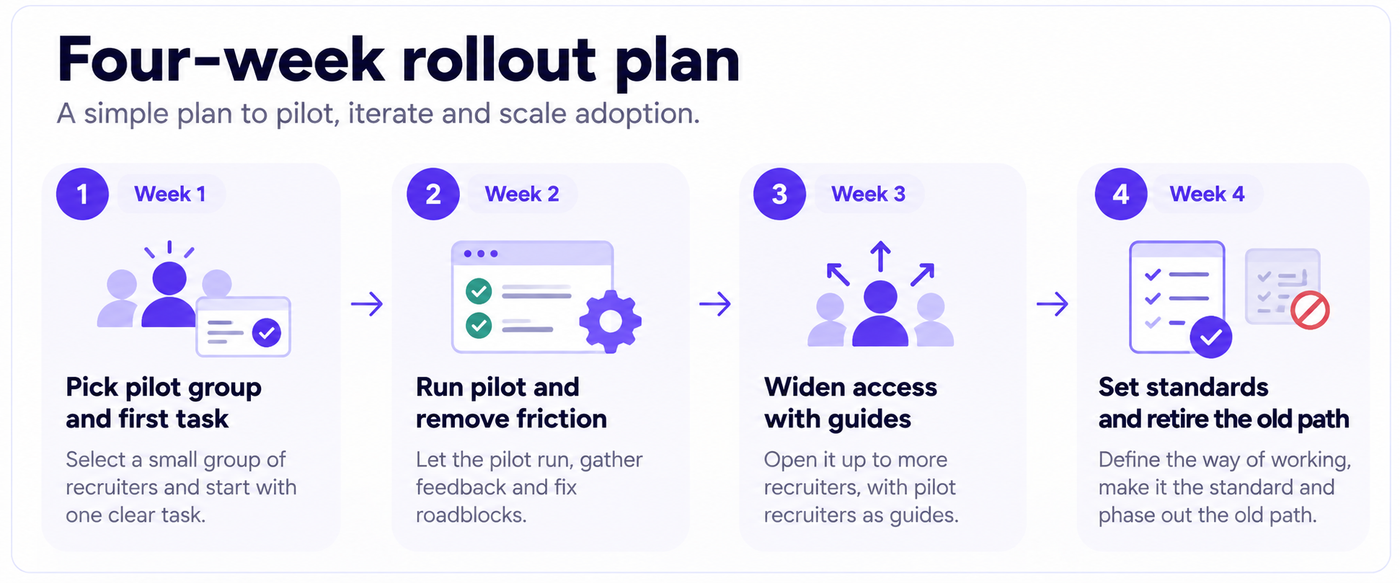
Week 1: Pick the Pilot Group and the First Task
Choose three to five recruiters for the pilot. Include one respected sceptic. If the sceptic comes round, the rest of the team will notice, and if they do not, you learn what to fix before everyone else sees it.
Pick one task for the pilot, not five. The best first task is high volume and low prestige: screening calls, interview scheduling or follow-up reminders. These eat hours, and recruiters seldom say they love them. Our guide to recruiting workflow automation explains which tasks are safest to automate first.
Set the baseline before you start. Record how long the task takes today, how many candidates a recruiter handles per day and how long candidates wait for a response. You need these numbers in week four.
Week 2: Run the Pilot and Remove Friction
Have the pilot group use the tool on real requisitions. Hold a fifteen-minute check-in every other day. Ask three questions: what slowed you down, what did the tool get wrong, and what would you tell a colleague?
Fix the small things fast. A field that is in the wrong order, a notification that arrives at the wrong time, an integration that needs a second login: these are the details that kill adoption. If you can resolve one within a day, the pilot group sees that feedback leads somewhere.
Keep a visible log of every issue and its status. It shows the team that concerns are being handled, and it gives you evidence for the wider launch.
Week 3: Widen Access With Pilot Recruiters as Guides
Bring in the next group. Let the pilot recruiters run short sessions, ten or fifteen minutes, showing how they use the tool in their real workflow. Peer demonstrations do more than vendor training, because they answer the question every recruiter is asking: does this work for someone like me?
Give managers a specific job. Ask each team lead to use the tool in their own routine for a week and to bring one example to the team meeting. Leaders who visibly use the tool set the norm.
Publish the pilot’s results internally: time saved on the task, candidate response times before and after. Share your own numbers, not a vendor’s.
Week 4: Set Standards and Retire the Old Path
By week four, most of the team should be using the tool. Now define what “normal” looks like. Which tasks must go through it? Where does the old spreadsheet stop being the source of truth? Who do people ask when it breaks?
This is the step teams skip, and it is why half-adoption becomes permanent. If both the old and new methods stay available, most people will use whichever feels familiar. Set a date after which the tool is the system of record for the pilot task, and hold to it.
Finish with a review. Compare against the week-one baseline, collect written feedback and decide what to extend next. A second task rolled out on the back of a working first one is far easier than a big-bang launch.
What this means for your hiring: Four weeks is enough to get a first task adopted, not enough to reach full maturity. Plan for a second cycle on a new task once the first is stable.
What Should You Communicate, and What Should You Leave Out?
Communicate what changes for the recruiter, why now, and what will not change. Leave out hype and promises you cannot keep.
Say these things plainly:
- The problem. Name the specific pain: slow screening, ghosted candidates, evenings spent on scheduling. Recruiters already know these problems and will trust a plan that starts there.
- The first task. Tell the team exactly which task the tool takes on, and which it does not.
- What stays with humans. Candidate relationships, hiring manager conversations, offer negotiation and final judgment. Say it early and mean it.
- How feedback works. Give people a channel and a name, and tell them how quickly you will respond.
- How success will be judged. If usage is part of performance conversations, say so up front and explain how.
Leave these out:
- Vague productivity promises. “This will make everyone twice as fast” invites disappointment and eye-rolling. Promise the specific outcome you measured in the pilot.
- Every feature at once. A tour of everything the platform can do overwhelms people. Teach one workflow.
- Mandates without reasons. “Everyone must use this from Monday” produces compliance in front of the manager and workarounds behind their back.
- Comparisons to a colleague’s speed. A leaderboard turns a learning curve into a ranking and costs you trust.
If the tool handles candidate data in new ways, tell recruiters what happens to that data. Questions about consent, storage and who can see conversations will come up, and recruiters are right to ask. Our DPDP Act compliance checklist for recruiters gives you the questions to have answers for before launch.
What this means for your hiring: Write a one-page rollout note before the pilot begins. Cover the problem, the first task, what stays human and how to give feedback. If you cannot fit it on one page, the plan is too complicated.
How Do You Handle the “This Replaces Me” Fear Honestly?
Handle it by answering it directly, with specifics, before someone else answers it for you. Silence gets read as a yes.
Do not say “AI will never replace recruiters.” You cannot know that, and recruiters can tell. What you can say honestly is what you know: which tasks the tool will take, which it will not, and what you plan to do with the time it frees up.
Be accurate about the difference between tools that assist and tools that act on their own. An assistant helps a recruiter write a message faster. An autonomous agent runs the screening conversation and books the interview without a recruiter in the loop. Our explainer on agentic AI versus recruiting automation draws the line clearly. Recruiters will notice the difference, so explain it rather than hoping it goes unnoticed.
Here is a way to structure the conversation:
- Name the task that is changing. “The tool will run first-round screening calls and schedule interviews.”
- Name the work that grows. “That gives you more time for candidate conversations, hiring manager relationships and closing offers.”
- Say what you will do with the capacity. More requisitions per recruiter, fewer late nights, better quality of shortlist. Pick the one you mean.
- Say what you do not know. “We will review how roles change after six months and talk to the team before anything changes.”
The third point carries the weight. If the honest plan is to cut headcount, recruiters will figure it out, and no amount of messaging will fix that. If the plan is to handle more roles without hiring, say so and describe how workload and targets will change.
What this means for your hiring: Hold one open conversation with the team before rollout. Bring answers to the questions above, take the hard questions live, and follow up in writing.
How Do You Measure Adoption, Not Just Deployment?
Measure adoption by what recruiters do with the tool each week, not by how many people have a login. Track these five measures weekly:
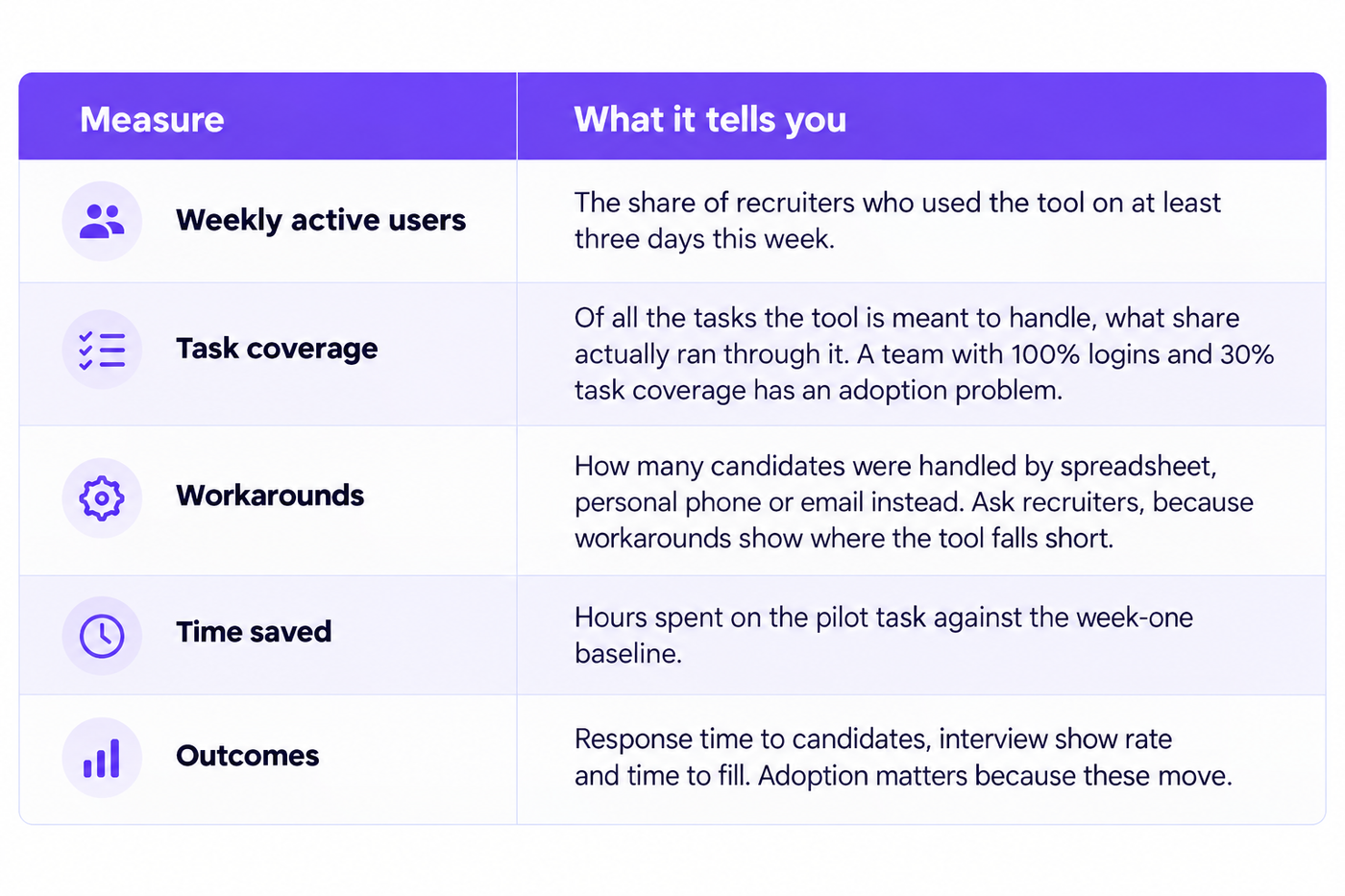
Add one qualitative check. Ask recruiters monthly, in a short anonymous form: would you go back to the old way, and why? A “yes” tells you which friction to fix next.
Interpret the numbers carefully. High usage with no change in outcomes usually means the tool is being used for the wrong tasks. Low usage with good outcomes among the users means your training or incentives are the problem. Segment by recruiter, team and task before deciding what to do.
Set targets before launch, for example 80% weekly active use and 70% task coverage by week eight. Targets keep the conversation about whether the rollout worked from turning into a debate about impressions.
What this means for your hiring: Put the five measures on one page and review it at the same weekly meeting for the first two months. What the leadership team reviews weekly gets used.
See how a rollout looks with your own roles and volumes. Book a free demo →
What Do Successful AI Recruiting Rollouts Have in Common?
Successful rollouts share five habits, and none of them depend on which tool you choose.
They start small and specific. One task, one pilot group, one baseline. The team sees a real result before being asked to change everything.
They have a named owner. Someone is accountable for adoption and has the authority to fix friction, adjust the plan and talk to leadership. Rollouts owned by “the team” belong to nobody.
They bring the sceptics in early. The recruiter who asks the hardest questions in week one is often the strongest advocate by week four, and those questions expose real gaps.
They tell the truth about the job. Honest answers about what the tool does, what stays human and what the plan is build the trust that adoption depends on.
They measure and adjust. They watch weekly use and outcomes, fix what is slowing people down and expand only when the first task is stable.
Gartner has described AI as requiring more change management than any previous technology, with only 14% of managers in a July 2025 survey reporting no challenges in driving effective use across their teams. Expecting friction is realistic. Plan for it, assign someone to handle it, and start with the task your recruiters would be happiest to give up.


