What Is a Recruiting CRM? Features, Uses and How to Choose One
 Tanmey Goswami
 ·Nov 10, 2026·10 min read

Key Takeaways
- 1A recruiting CRM organises people and conversations across every role, so each new requisition starts with a search of candidates you already know.
- 2SHRM's 2026 benchmarking puts median time-to-fill at 39 calendar days for nonexecutive roles, and a searchable pool attacks the sourcing share of that time.
- 3Seven features carry most of the value: profiles, search, sequences, two-way messaging, a unified inbox, pipeline sync and consent records.
- 4WhatsApp gets a 64% response rate in India against about 12% for email (HireBound data), so an email-only CRM undercuts re-engagement there.
- 5Judge a recruiting CRM on one live role in a two-week trial, scoring five weighted criteria from 1 to 5.
A recruiting CRM is software that stores every candidate you have sourced, screened or spoken to, along with the full history of those conversations. It lets recruiters search, segment and re-contact that pool when a new role opens. An applicant tracking system follows one job, while a recruiting CRM follows each person across every job you hire for.
This guide covers the software itself: what it does each day, which features matter, how it differs from an ATS, and who needs one. It ends with an evaluation checklist and a trial scorecard you can use with any vendor. If you want the practice behind the tool, our guide to candidate relationship management covers the workflow and message examples.
Want your past candidates to surface the moment a role opens? See how HireBound keeps your pool and your pipeline in one place. Explore HireBound →
What Is a Recruiting CRM?
CRM stands for candidate relationship management in in-house teams. In agencies it often covers client relationship management as well. In both cases, recruiting CRM software is a system of record for people, organised around profiles, tags and contact history rather than requisitions.
A record in a recruiting CRM stays useful long after any single hiring process ends. It holds the candidate's skills, location, salary expectations, notice period and the stage they reached last time. It also holds every message, call note and reply, whichever recruiter sent it.
You will also see the software called a talent CRM or recruitment CRM. Whatever the label, judge the tool on one thing: does it help you reach known candidates faster than you could find new ones?
What Does Recruiting CRM Software Do Day to Day?
Recruiting CRM software does five jobs in a normal week: capture, organise, engage, convert and report. Each one replaces a manual habit that usually lives in spreadsheets, inboxes and one recruiter's memory.
- Capture. Profiles arrive from sourcing, applications, referrals, career pages and imports. The CRM merges duplicates so one person has one record.
- Organise. Recruiters tag people by role family, seniority, location and availability. Saved searches turn those tags into ready-made lists.
- Engage. The CRM sends sequences and one-off messages, then logs every reply against the profile. Follow-ups go out on schedule even when the recruiter is busy.
- Convert. When a candidate is interested, they move into an active pipeline for a live role. Their history moves with them.
- Report. Dashboards show reply rates, pool size by segment and how many hires came from the pool rather than fresh sourcing.
The diagram below shows how a candidate record moves through those five jobs.
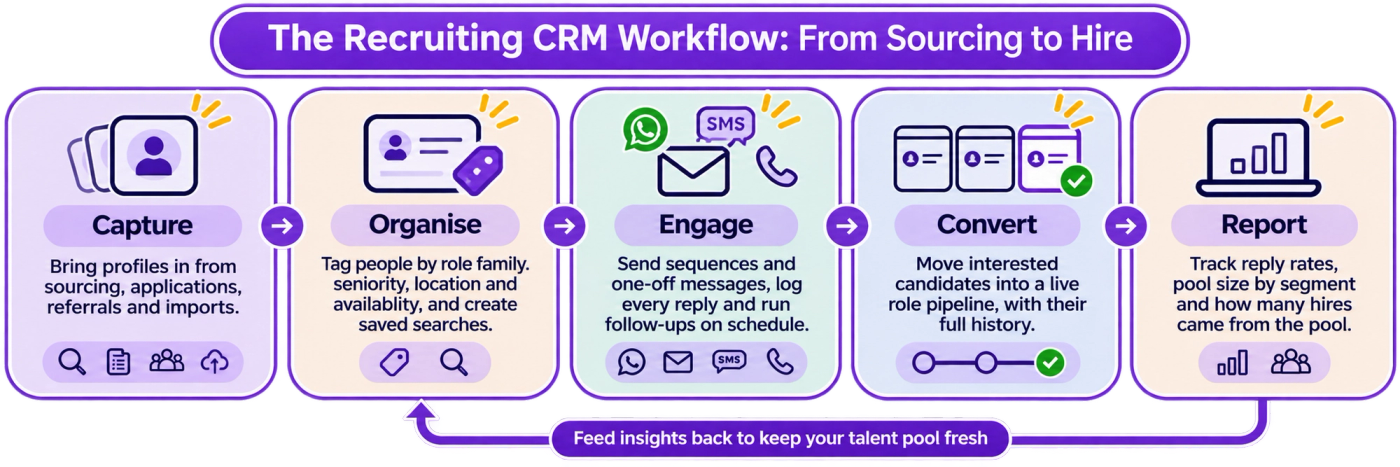
The loop back from reporting to organising is where most of the value sits, because each hiring cycle leaves the pool better tagged than before.
Who Uses a Recruiting CRM?
Three kinds of team get the most from a recruiting CRM. Each uses it for a slightly different reason.
Staffing and recruitment agencies. An agency's speed depends on how quickly it can put a qualified name in front of a client. A warm pool lets a recruiter submit candidates on day one of a mandate. Agencies also use the client side of the CRM to track contacts, past placements and likely new requirements.
High-volume corporate hirers. BPO, retail, logistics and manufacturing teams hire similar profiles every month. A candidate who missed out in one batch is often right for the next one. Without a CRM, that person sits in a closed requisition and the team pays to source them again.
Specialist and tech hiring teams. Hard-to-fill roles reward relationships that start months before a requisition exists. A CRM keeps those conversations going without a recruiter keeping a private list.
Talent shortages raise the value of a known pool. ManpowerGroup's 2026 Global Talent Shortage Survey found that 82% of employers in India report difficulty finding the talent they need. When fresh sourcing is that hard, the people you already know are worth more.
What Features Should a Recruiting CRM Have?
A recruiting CRM needs seven core features to do its job. The table below lists them, with what each does and how to test it in a demo.
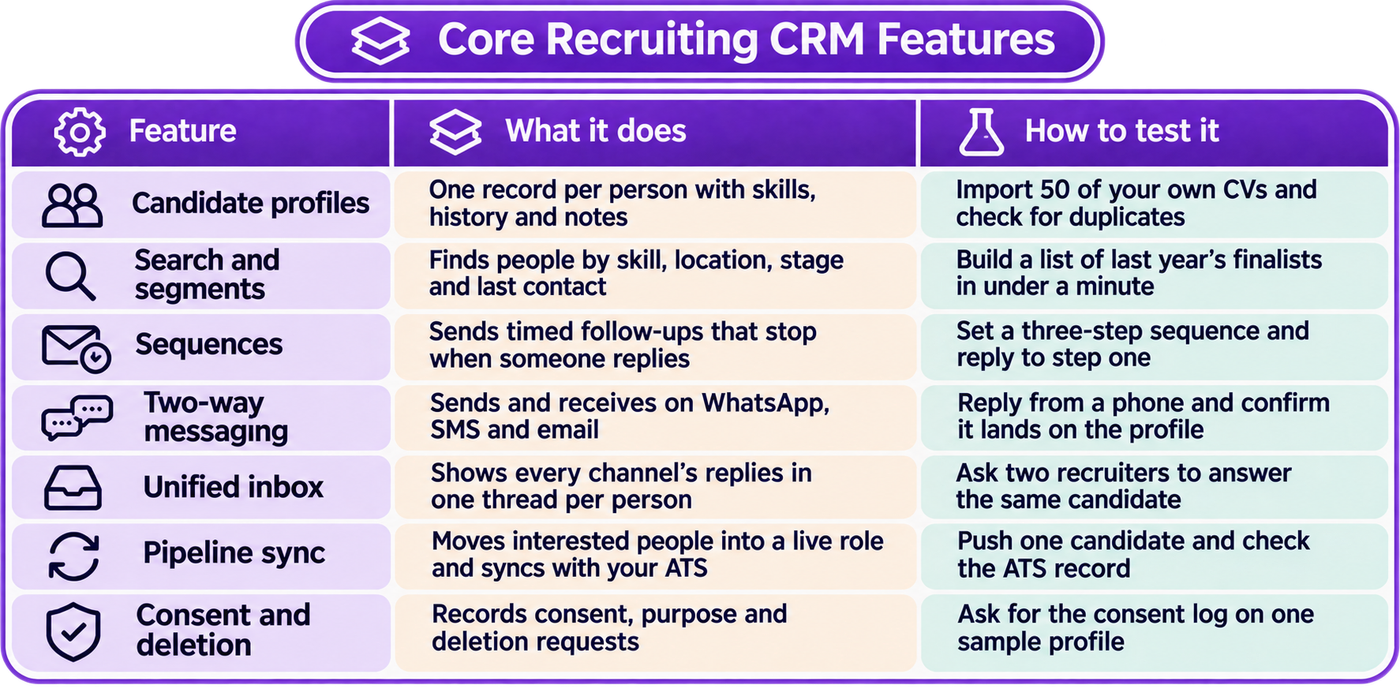
If a tool fails the two-way messaging or pipeline sync test, it will behave like a contact list, however good the rest looks.
Features That Separate Good Tools From Average Ones
Beyond the core seven, a few capabilities decide how much recruiter time the software saves:
- AI ranking and match reasoning. The CRM scores people in the pool against a new role and explains why each one fits.
- Automated stage updates. Replies, screens and bookings move candidates between stages without manual edits.
- Multilingual conversations. Messages and screening calls work in the languages candidates actually use.
- Role-based permissions. Agencies can keep each client mandate separate, and corporate teams can give hiring managers view-only access.
- Scheduling inside the conversation. Interested candidates pick an interview slot in the same thread.
How Is a Recruiting CRM Different From an ATS?
An ATS is organised around jobs, and a recruiting CRM is organised around people. The ATS tracks applicants through the stages of one open requisition and keeps a compliance trail. The CRM keeps relationships alive across many roles and many months, including with people who never applied.
The differences show up in three places.
Time horizon: an ATS record matters for weeks, a CRM record for years. Population: an ATS holds applicants, while a CRM also holds sourced, referred and passive candidates. Activity: an ATS enforces process, while a CRM nurtures and re-engages.
Many teams run both, and many platforms combine them. For the full side-by-side breakdown, read our comparison of recruitment CRM vs ATS. If you are new to the ATS side, start with what an applicant tracking system is.
Why Does WhatsApp Matter for a Recruiting CRM in India?
A recruiting CRM is only as useful as the reply rate it can earn. In India, that points to WhatsApp. HireBound's data shows a 64% response rate on WhatsApp against about 12% for email.
The channel's reach explains much of the gap. When the government notified India's IT Rules in February 2021, its release listed 53 crore WhatsApp users in the country. For frontline, BPO and early-career roles, WhatsApp is often the only channel a candidate checks every day.
WhatsApp-first nurturing changes how the CRM should work:
- Short, specific messages. "Are you still open to night-shift support roles in Pune?" earns a reply where a long email does not.
- Quick replies and documents. Candidates should be able to answer screening questions and send a CV in the same chat.
- Language choice. A candidate who prefers Hindi or Tamil should get messages in that language.
- Opt-out handling. One tap stops messages, and the CRM records the opt-out on the profile.
India's data rules matter here too. The Digital Personal Data Protection Rules were notified on 14 November 2025. They require a separate, clear consent notice that explains the specific purpose of collection, according to the PIB backgrounder on the DPDP Rules.
The Rules give organisations 18 months for phased compliance. A CRM that stores consent and purpose on each profile makes that work routine. Confirm specific obligations with your legal team.
When Do You Need a Recruiting CRM?
You need a recruiting CRM when re-finding known candidates costs more than finding new ones. A few signals make that obvious:
- Recruiters keep asking, "Who was that strong candidate from last year?" and nobody can find them.
- You hire the same profile more than three or four times a year.
- More than one recruiter contacts the same candidate without knowing it.
- Candidates go quiet because follow-ups depend on someone remembering to send them.
- A recruiter leaves and their candidate relationships leave with them.
Recruiter load is rising too. SHRM's 2026 Recruiting Executives Benchmarking, built on data from more than 4,600 organisations, reports a median time-to-fill of 39 calendar days for nonexecutive roles. The same study found a 67% rise in median requisitions per recruiter at extra-large organisations, according to SHRM's recruiting benchmarking summary.
The graphic below sorts teams by these signals.
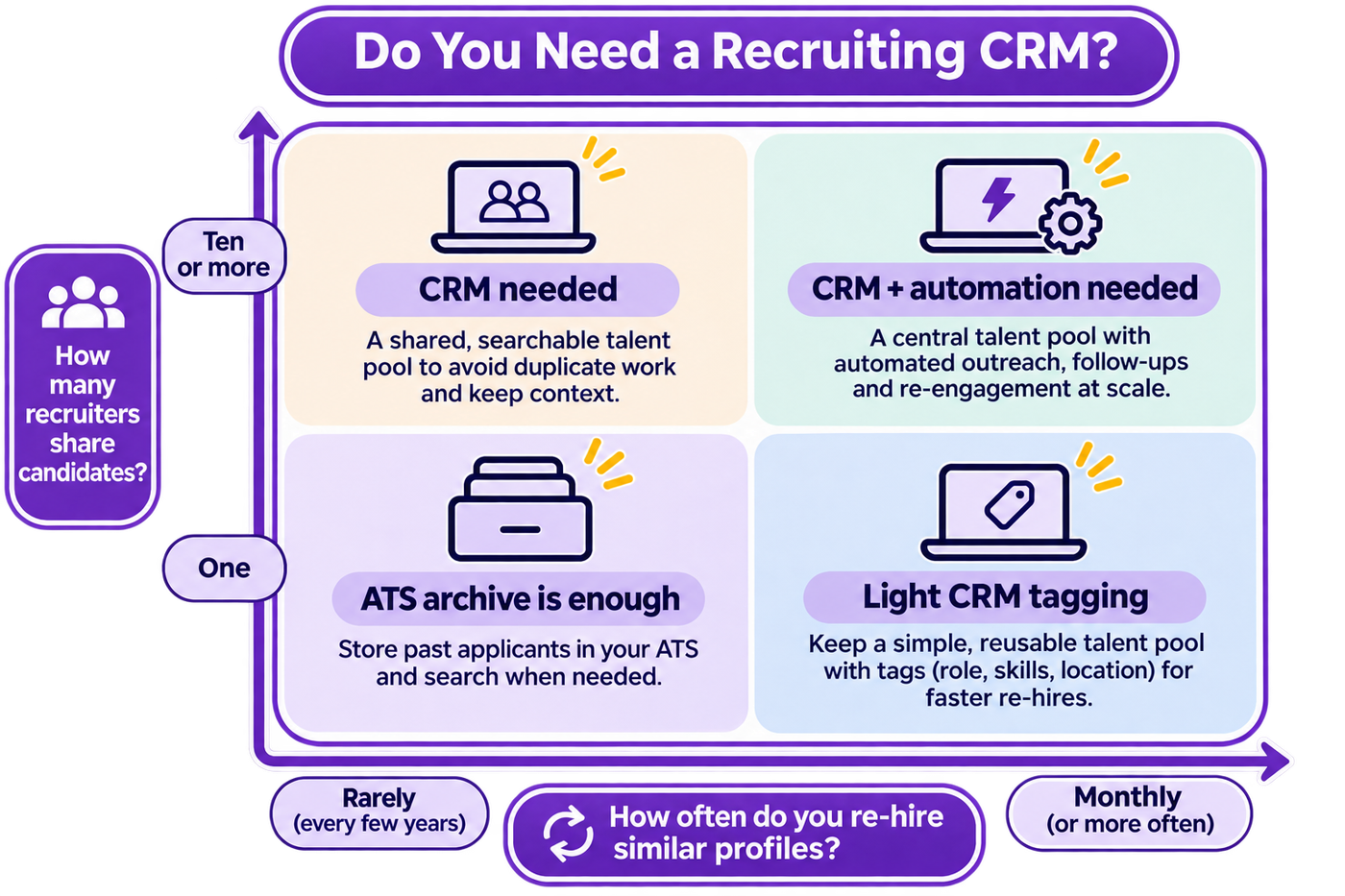
Teams in the top-right quadrant usually lose the most time to manual follow-up, so they gain the most from a recruiting CRM with automation built in.
A small team hiring a handful of roles a year is often fine with a well-tagged ATS archive. Revisit the decision once re-hiring becomes routine.
How to Choose a Recruiting CRM: An Evaluation Checklist
Choosing a recruiting CRM goes best when you fix your criteria before the first demo. Work through these ten questions with every vendor and write the answers down.
- Does it reach candidates where they reply? Check native WhatsApp, SMS, email and voice, with replies logged automatically.
- Can it find a past candidate in under a minute? Test it with your own data, not the demo set.
- How much does it do without a recruiter? Ask which follow-ups, screens and bookings run on their own, and which need a click.
- Does it connect to your ATS both ways? A one-way export goes stale within a quarter.
- Does it rank the pool against a new role? Ranking with reasons saves the most time on large pools.
- Can it separate client mandates or teams? Agencies need per-client pipelines and permissions.
- How does it handle consent? Ask to see consent capture, the purpose field, opt-outs and deletion on request.
- Does it support your candidates' languages? In India, that often means Hindi plus at least one regional language.
- What do the dashboards show? Look for reply rate, pool hires and time-to-shortlist by source.
- How is data exported if you leave? Ask for the format and the full field list.
The first three questions do most of the sorting. A tool that cannot reach candidates, find them fast or follow up on its own will not change how your recruiters spend their week.
What Mistakes Do Teams Make When Buying Recruiting CRM Software?
Most poor CRM purchases fail for the same four reasons.
Buying a database instead of a workflow. A tool that stores profiles well but cannot message, follow up or move people into a pipeline becomes a second archive. Recruiters stop opening it within weeks.
Skipping data clean-up. Importing years of duplicate, stale records gives the new tool a poor first impression. Clean, merge and tag your best 2,000 to 5,000 records first.
Leaving nobody in charge of the pool. Tags drift and segments go stale unless one person owns them. Name an owner before launch, not after.
Judging on the demo. A scripted demo shows the vendor's best case on clean data. Your recruiters, roles and candidates are the real test.
How Do You Run a Recruiting CRM Trial?
Run every shortlisted recruiting CRM on one live role for two weeks, with the same recruiters and the same candidate list. Score five criteria from 1 to 5 at the end. The scorecard below gives you a starting point.
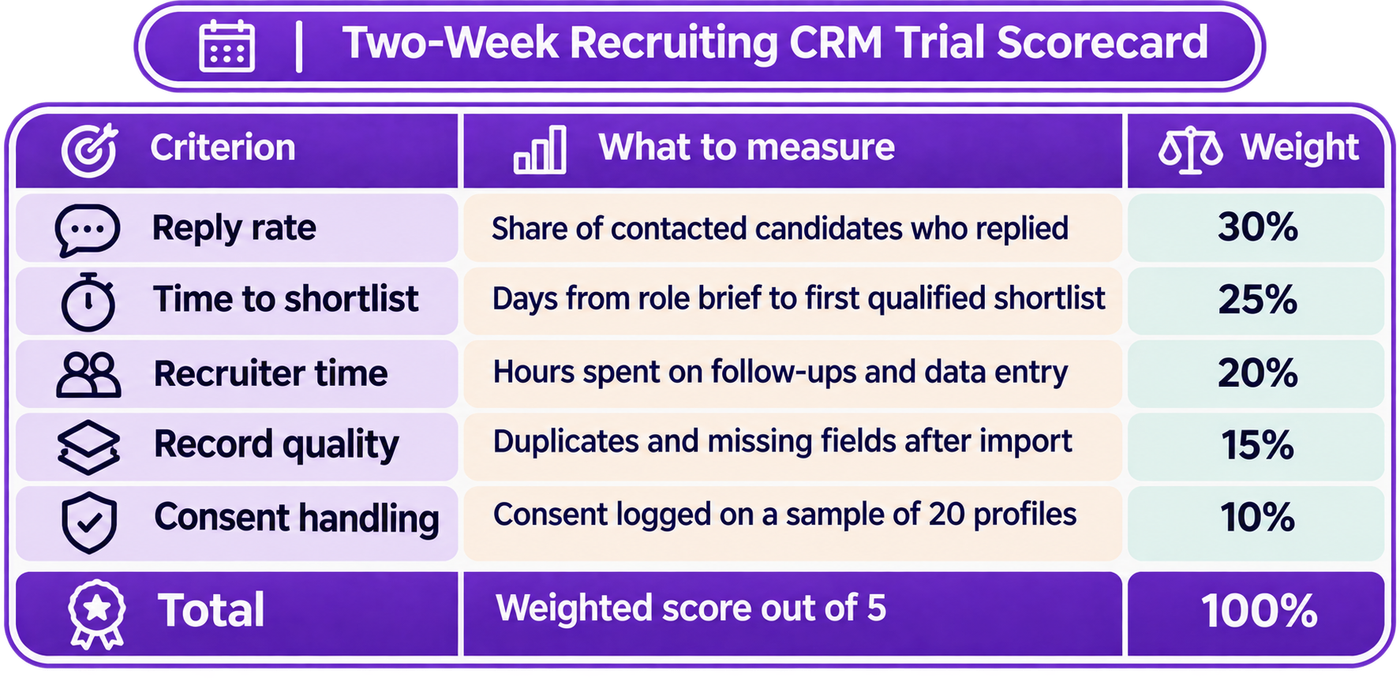
Weight reply rate and time to shortlist most heavily, because those two numbers decide how fast the next role fills.
Keep the trial honest. Use the same role, the same pool and the same message content in each tool. Ask recruiters to log the minutes they spend, not just their impressions.
Where Does HireBound Fit?
HireBound's Smart CRM is the workspace where sourced, screened and scheduled candidates are staged, scored and shared with the team. Live candidate profiles hold sourcing history, messages, screening answers, scores, recordings and transcripts in one place. A unified inbox threads replies from WhatsApp, email, SMS and calls.
The CRM sits alongside HireBound's AI agents for sourcing, screening, scheduling and evaluation. When an agent screens a candidate on WhatsApp or in a Voice AI call, the stage updates on its own with an attributed activity log. Voice AI screening works in 14 Indian languages, and AI Discovery can rank your existing pool against a new role before anyone sources externally.
HireBound has powered 8 million+ candidate conversations, and recruiters using it handle 3× more candidates per day than with a manual process. Smart CRM syncs with an existing ATS in supported workflows, so teams keep their system of record. Recruiters keep the judgement calls: who to shortlist, how to close and when to say no.
Agencies running several client mandates can see per-client pipelines and white-labelled dashboards in HireBound's recruiting software for staffing agencies.
Ready to see a recruiting CRM that does the follow-up for you? Talk to us about your roles and your candidate pool. Book a free demo →
What Should You Do Next?
Start with the signals. If your team re-hires similar profiles often, or loses candidates when recruiters leave, a recruiting CRM will pay its way.
Then write your checklist before you see a demo, and run a two-week trial on one live role. The tool that earns the most replies and the fastest shortlist on your own candidates is the one to buy.


