How to Automate Candidate Screening: A Step-by-Step Guide
 Tanmey Goswami
 ·Oct 22, 2026·9 min read
Key Takeaways
- 1Automate the repetitive first pass of asking set questions, scoring and ranking, and keep people on borderline cases, bias checks and the hiring decision.
- 2Structured interviews have a mean validity of .42 against .19 for unstructured ones (Sackett et al., 2022), so fix questions and rubric before choosing software.
- 3ManpowerGroup and Everest Group (2026) found over 90% of organisations use AI in hiring but under 5% report transformational results, so pilot one role.
- 465% of 3,055 Indian employers plan to add staff in Q4 2026 (ManpowerGroup), and HireBound data shows 64% WhatsApp response against about 12% for email.
- 5Send a sample of every decline and every borderline score to a recruiter each week, because the EU AI Act treats recruitment AI as high-risk.
To automate candidate screening, define the criteria first. Then let software ask every candidate the same structured questions, score the answers against your rubric, and hand a ranked shortlist to a recruiter. Automation handles the repetitive first pass. People keep the borderline cases, the bias checks and the hiring decision.
This guide gives seven steps, a four-week rollout and the numbers to track. It is written for recruiting leads and TA heads who screen many candidates for each role.
Want screening that asks, scores and shortlists on the channels candidates use? See how HireBound works →
What Does It Mean to Automate Candidate Screening?
Automated screening, often called AI screening, means software runs the first pass that a recruiter used to run by hand. It contacts candidates, asks role-specific questions, records the answers and scores them against criteria you set.
It differs from a keyword filter. A filter reads a CV and matches terms. An automated screen collects fresh answers and can ask a follow-up when an answer is vague.
The diagram below shows the flow from application to shortlist.
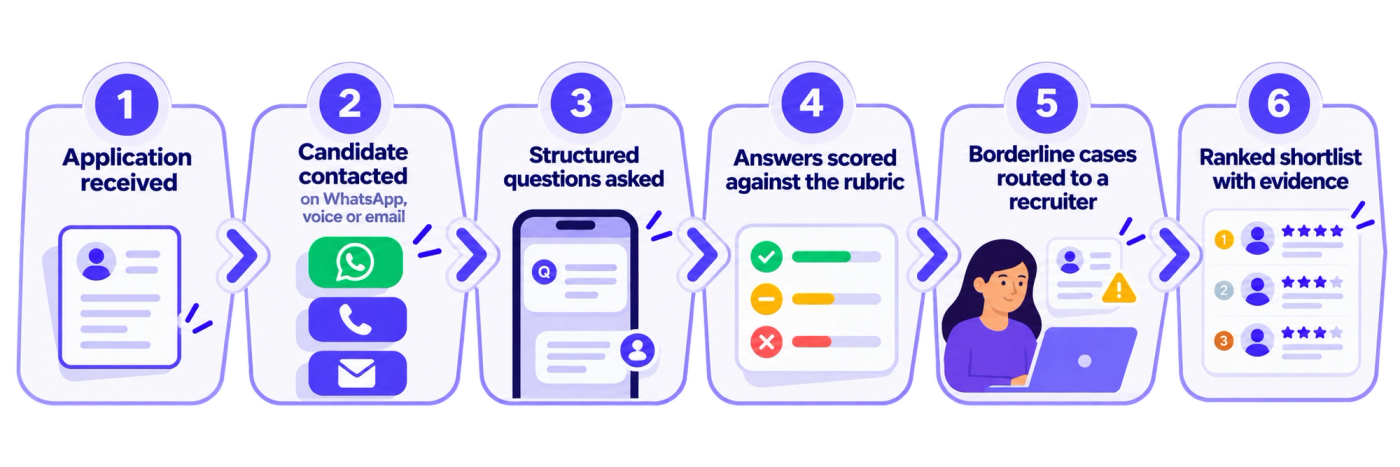
The recruiter appears at two points in the flow: the borderline cases and the shortlist.
Which Steps of AI Screening Can You Automate?
Automate tasks that are repetitive, urgent and low in judgment. Keep people on the tasks that decide who gets hired.
Safe to automate:
- Contacting every applicant and sending reminders.
- Asking the same role-specific questions in the candidate’s language.
- Collecting basics such as location, shift availability, notice period and expected pay.
- Scoring answers against written criteria.
- Ranking candidates and updating pipeline stages.
Keep with a recruiter:
- Setting the criteria and the thresholds.
- Reviewing borderline scores and a sample of declines.
- Handling sensitive questions, accommodation requests and complaints.
- Making the final hiring decision.
Use one test. If a wrong call is cheap and reversible, automate it. If a wrong call changes someone’s job prospects, a person should review it.
How Do You Automate Candidate Screening Step by Step?
Work through seven steps in order. The sequence matters, because software cannot fix criteria that were never written down.
Step 1: Write the Screening Criteria
List what the role needs, and split it into must-haves and nice-to-haves. Must-haves are the few facts that disqualify someone if missing, such as work authorisation, location or shift availability.
Keep the list short. Every extra must-have shrinks the pool and adds a chance to screen out a good candidate for a reason that does not matter.
Here is an example for a customer support role in a BPO. The must-haves are fluency in the required language, availability for the shift pattern, and a location within commuting range. The nice-to-haves are prior voice experience and basic computer skills.
Step 2: Turn the Criteria Into Questions
Write three to five job-related questions that test the criteria. Ask every candidate the same questions in the same words. Our guide to pre-screening questions gives examples by what each question reveals.
Here is an example set for a customer support role in a BPO:
- Which shifts can you work, and from what date?
- Which languages can you speak and write fluently?
- Tell us about a time you calmed an upset customer.
- How would you handle two urgent requests at once?
- What is your expected pay and notice period?
The first two and the last question collect facts, and the middle two test judgment. Score the judgment questions against written anchors.
Step 3: Choose Channels and Languages
Pick the channels your candidates answer. In India that usually means WhatsApp and phone, with email as a backup. Offer the screen in the candidate’s language wherever you can, and give candidates who cannot type easily a voice option.
Step 4: Set the Scoring and the Thresholds
Write a rubric with anchors for a weak, an adequate and a strong answer. Then set three bands: advance, review and decline. Send the “review” band to a person.
Do not set a single hard cut-off and reject everyone below it. Treat a score as an input to the decision.
Here is a simple example of three bands on a five-point scale. A score of 4 or 5 advances the candidate. A score of 3 goes to a recruiter for review.
A score of 1 or 2 is declined, and a recruiter checks a weekly sample of those declines. Set the cut points from your pilot, not from a default.
Step 5: Route Borderline Cases to a Human
Give recruiters a queue for the review band, with the answers, the score and the reasons beside each candidate. Add a weekly sample of declines, so you can check that the rubric is not screening out good people. Set a target time for the review queue, such as one working day, so borderline candidates do not wait.
Step 6: Pilot on One Role
Run the automated screen on one role for two weeks, alongside your manual process. Compare the two shortlists on three points: how many candidates appear on both, which candidates only one method found, and how long each took. If the overlap is high and the automated screen was faster, widen it. If the lists differ, read the differences before you decide which method was right.
Step 7: Measure and Adjust
Review completion rate, score spread and recruiter overrides weekly for the first month, then monthly. Change questions that do not separate candidates, and fix any step where candidates drop out.
Keep a short change log. When a number moves, you will want to know which edit caused it, and the log also helps a new recruiter learn why the screen looks the way it does.
The table sets out a four-week rollout that follows these steps.
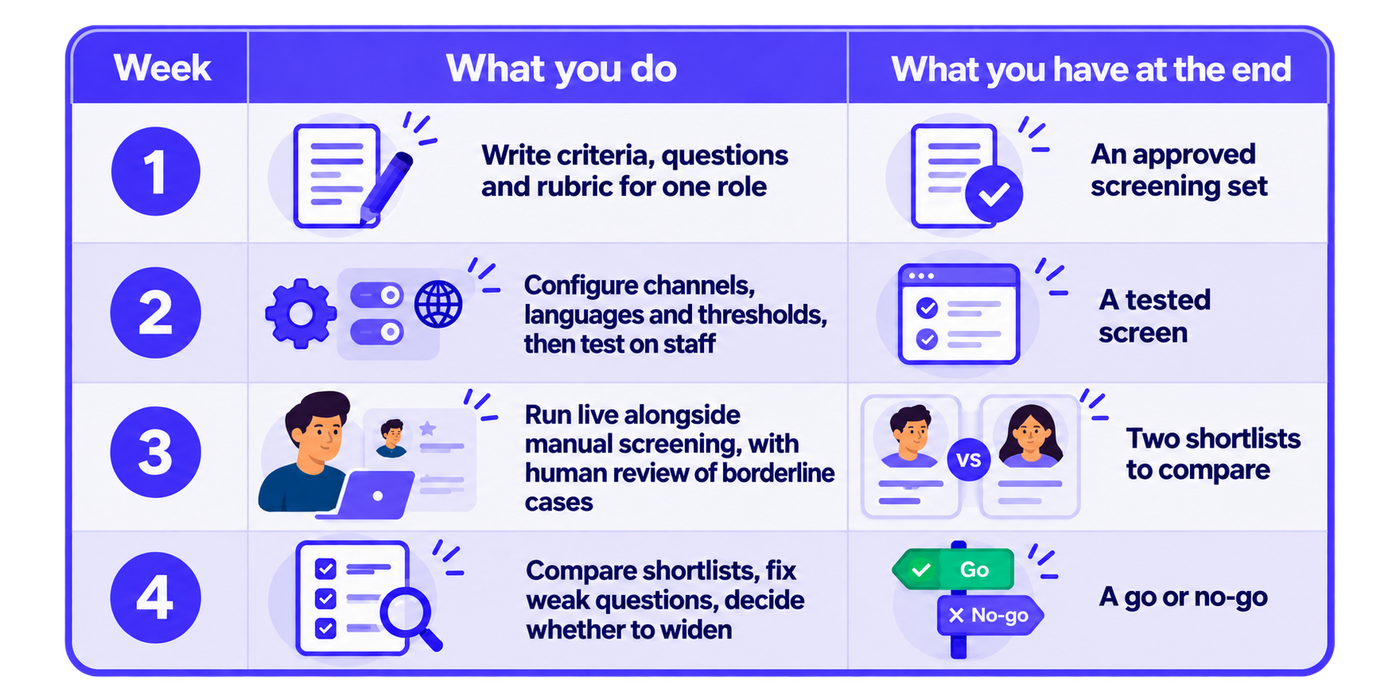
Widen to a second role only when the first role’s numbers hold.
What Does the Evidence Say About Structured Screening?
The evidence favours fixed questions. Sackett, Zhang, Berry and Lievens report a mean validity of .42 for structured interviews and .19 for unstructured ones in the Journal of Applied Psychology (Sackett et al., 2022). Asking every candidate the same job-related questions is the core of what makes an interview structured.
The adoption data urges caution. ManpowerGroup Talent Solutions and Everest Group’s 2026 report found that more than 90% of organisations have deployed AI in talent acquisition, and fewer than 5% report transformational outcomes. ManpowerGroup commissioned the research, so read it as the sponsor’s survey.
In our view, the gap often comes from adding automation to a process that was never clear. Writing the criteria and questions first, and piloting on one role, addresses that directly. Our guide to what AI in recruiting means covers where AI helps and where it falls short.
Where Should Humans Stay in the Loop?
Humans stay wherever a screening decision affects someone’s prospects. Four checkpoints cover the main risks.
- Criteria and thresholds. A person sets them and signs them off.
- Borderline scores. A recruiter reviews them with the evidence in view.
- A sample of declines. A weekly check catches rubric problems.
- The final decision. A hiring manager or recruiter makes it.
Regulators treat recruitment AI as high-stakes. The EU AI Act classifies recruitment and candidate-evaluation systems as high-risk. Under Article 99, breaches of the high-risk obligations can bring fines of up to €15 million or 3% of worldwide annual turnover, whichever is higher. If you hire in India, our guide to AI hiring laws in India covers the rules that apply to you.
Test for bias before you scale. Check whether score patterns differ by gender, location or language group, and investigate any gap before it becomes a pattern.
How Does Automated Screening Work in India?
India’s volume makes automation relevant. ManpowerGroup’s Employment Outlook Survey for Q4 2026 covered 3,055 employers in India. It put the Net Employment Outlook at 54% and found that 65% of employers plan to increase staffing between October and December.
Three things shape the design.
First, the channel. HireBound data shows a 64% WhatsApp response rate in India, compared with about 12% for email. Run the screen where candidates reply. Our guide to WhatsApp recruiting covers opt-in, timing and message design.
Second, language. Candidates may answer more fully in Hindi, Tamil, Telugu or another regional language. HireBound’s Voice AI works in 14 Indian languages.
Third, consent. India’s Digital Personal Data Protection Act, 2023 requires consent, or another use the Act specifically permits, before personal data is processed. The DPDP Rules, 2025 were notified in November 2025, with most obligations phased in over 18 months. Tell candidates about recording before the screen starts.
The infographic below shows how a screen can reach a candidate on each channel.
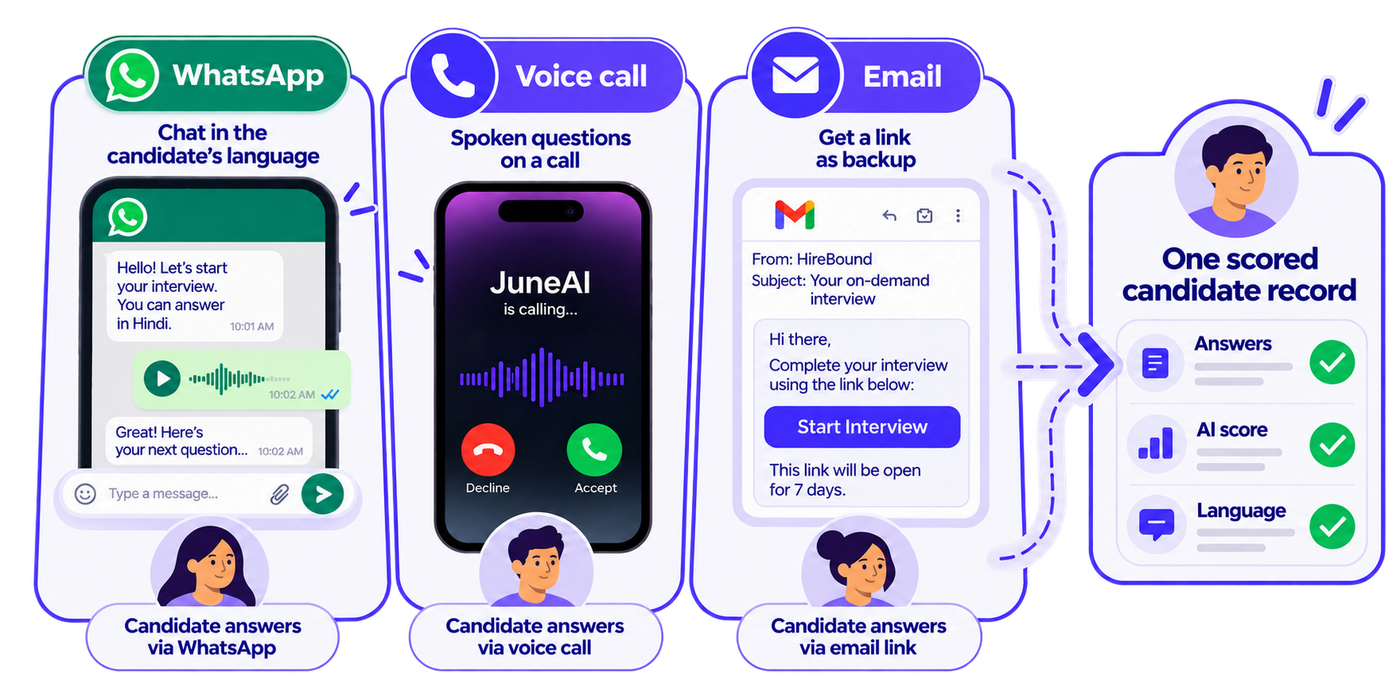
Every channel feeds one record, so a recruiter sees one set of answers.
What Does the Time Saving Look Like in a Worked Example?
Here is an illustrative example with assumed numbers. A team receives 500 applicants for one role. A recruiter spends 10 minutes on each first call, which is 5,000 minutes, or about 83 hours.
With an automated screen, assume the review band holds 100 candidates and a recruiter spends 3 minutes on each. That is 300 minutes, or 5 hours, plus a sample check of declines.
The 10-minute and 3-minute figures and the size of the review band are assumptions, so replace them with your own pilot data. The point of the example is the shape of the saving: recruiter time moves from every first call to the cases that need judgment.
What Mistakes Make Automated Screening Fail?
Five mistakes are common.
- Automating unclear criteria. Software repeats whatever you give it, including vague requirements.
- Too many knock-out questions. Each one cuts the pool, and some cut good candidates.
- No human review of declines. Without a sample check, rubric errors go unseen.
- Email-only outreach. Candidates in India reply on other channels.
- Skipping the pilot. Going live on every role at once hides which step is failing.
How Do You Measure Automated Screening?
Track a handful of numbers weekly, and compare them with your manual baseline.
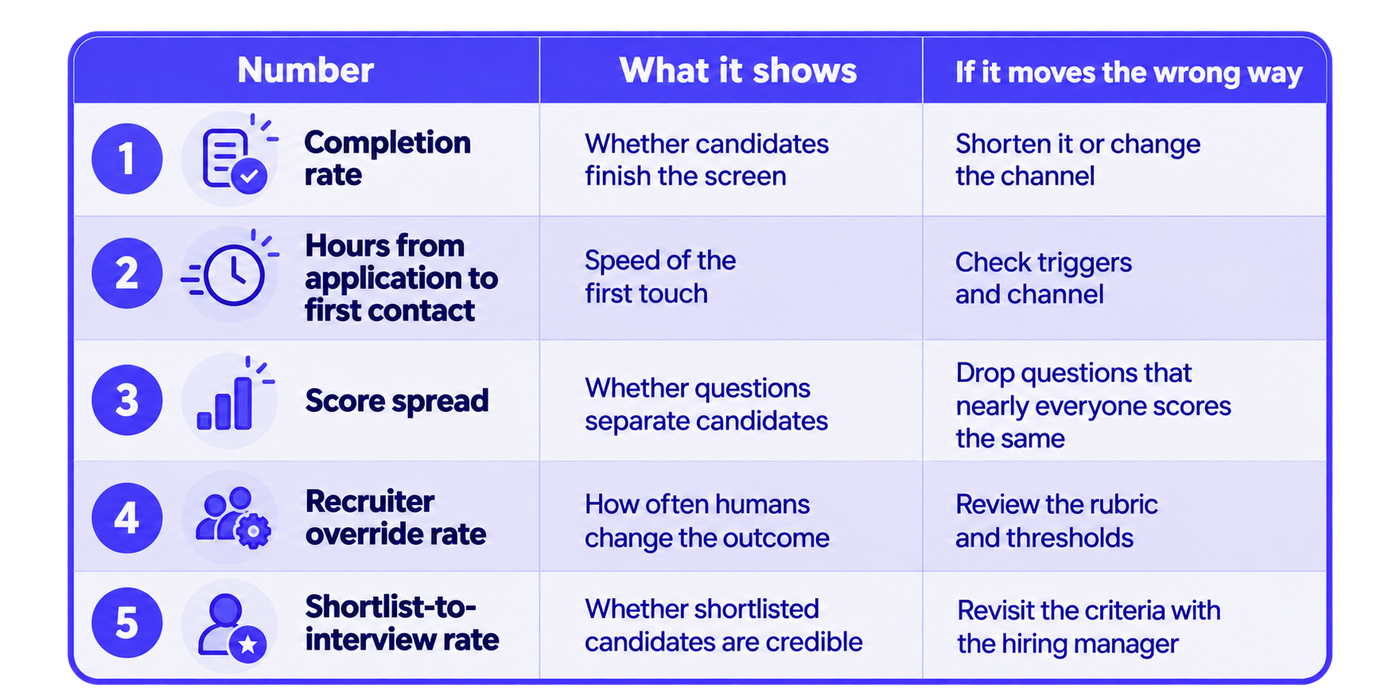
A high override rate means the rubric needs work. A very low rate can mean reviewers are not looking.
Where Does HireBound Fit?
HireBound’s Screening Agent holds structured conversations over Voice, WhatsApp and Email, in multiple languages, and scores and shortlists candidates against the criteria you set, with recruiters reviewing the output. It keeps the recording and transcript with the candidate record, and agent activity updates pipeline stages with an attributed log.
HireBound has powered 8 million+ candidate conversations, and 60+ recruiting teams in India run on the platform. Recruiters using HireBound handle 3× more candidates per day than with a manual process.
Want to pilot automated screening on one live role? Talk to HireBound about a pilot →
Conclusion: A Decision Rule for Automating Screening
Write the criteria and questions first, pilot on one role, keep humans on borderline cases and declines, and widen only when the numbers hold.
Apply one rule. If most of your recruiters’ week goes on asking the same first questions of many candidates, weigh automated screening most heavily. If most of it goes on rare, senior searches, a recruiter-led screen will serve you better.


