Recruitment Agency Software: How to Choose the Right Tools
 Tanmey Goswami
 ·Oct 16, 2026·11 min read
Key Takeaways
- 1Judge agency software by how much recruiter work it removes. Ask which tasks still land on a recruiter’s desk after setup.
- 2The Indian Staffing Federation reported 7.5% year-on-year growth in staffing employment in Q1 2026-27, so agencies have more candidates to source and screen.
- 3Weights decide the winner: in the worked exercise, the same two tools swap places between a 25-recruiter volume agency and an 8-recruiter niche firm.
- 4HireBound data shows a 64% WhatsApp response rate in India against about 12% for email, so test channel reach in the demo.
- 5India’s DPDP Rules set an 18-month phased timeline from November 2025, so ask vendors how consent, retention and export will work.
Recruitment agency software is the set of tools a staffing or recruitment firm uses to manage client mandates, find and engage candidates, screen them, schedule interviews and report progress. It usually spans a recruiting CRM or ATS, sourcing, candidate outreach, scheduling and analytics. The right choice depends on how much of that work a recruiter should keep doing.
Buying on features alone can leave recruiters with more work than expected. Two tools can both claim “AI screening” and leave very different amounts of work on the recruiter’s desk. This guide gives you six criteria, a scoring exercise with real arithmetic, and a list of demo questions.
Want to see how agents handle sourcing, screening and scheduling for an agency? Explore HireBound →
What Does Recruitment Agency Software Actually Cover?
Agency software falls into four categories, and most products cover one or two of them well. The table shows what each does and what it leaves with the recruiter.
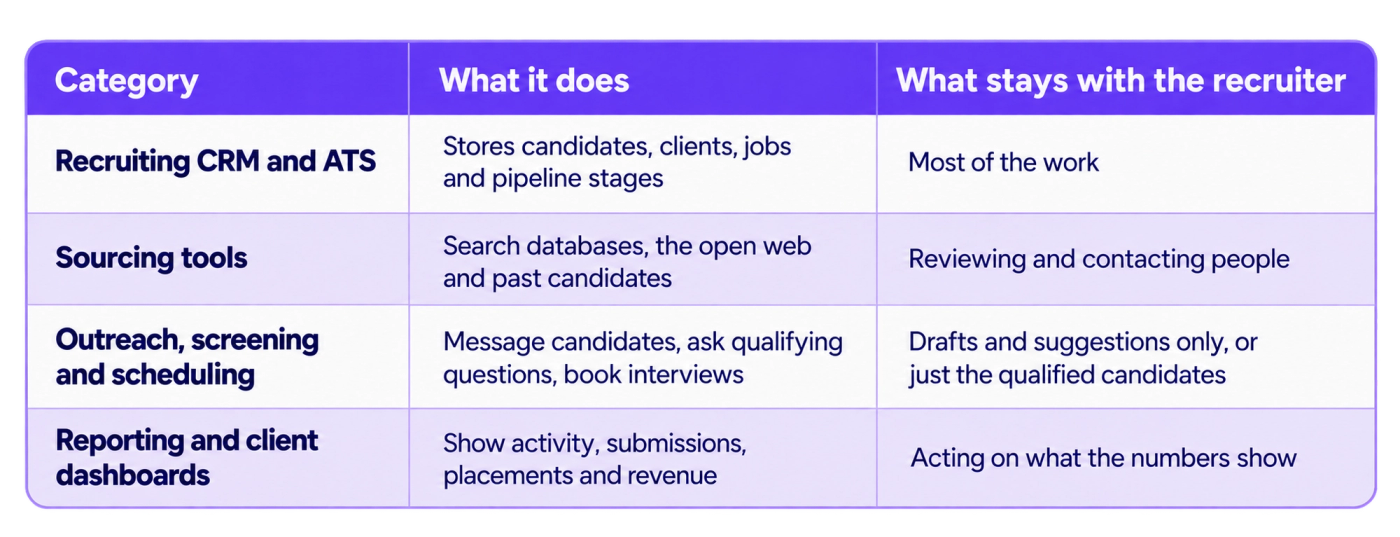
The category tells you what a tool will not do. Our guide to recruitment CRM vs ATS explains how the first category splits in two and why agencies usually need both functions.
A single product can span several categories. “All in one” can mean a CRM with a few assistive features, or a platform where agents run sourcing, screening and scheduling while the CRM tracks results.
Why Does Agency Software Differ From Corporate Hiring Software?
An agency runs many clients at once, each with its own roles, rules and reporting expectations. A corporate team runs one employer’s hiring. That difference changes what the software must do.
Three agency facts shape the buying decision.
- You are paid per placement or mandate, so recruiter hours are your main cost and constraint.
- Candidates and clients overlap, so you need clean separation between mandates and a clear record of who was submitted where.
- Clients ask for status, so reporting is part of the service you sell, not an internal nicety.
The market is also growing in a way that stresses capacity. The Indian Staffing Federation’s Q1 2026-27 report shows staffing employment up 7.5% year on year. Its members added 1.14 lakh new formal flexi jobs in four quarters and represent 1.95 million formal flexi workers (accessed 11 October 2026).
More workers placed means more candidates to source, screen and follow up. Software that lifts output per recruiter matters more here than software that only stores records.
For the metrics that show whether your agency is productive, see our guide to staffing agency KPIs.
What Should You Look for in Recruitment Agency Software?
Use six criteria, and give each a weight before you see a demo. Weights written after a demo drift toward whatever the salesperson showed you.
- How much recruiter work the tool removes.
- Whether it reaches candidates on the channels and in the languages they use.
- How well it runs several client mandates at once.
- How it connects to the systems you already use.
- What it really costs over two years.
- How it handles candidate data, and how you leave.
The next six sections take each one in turn, with the test to run in a demo.
Criterion 1: How Much Recruiter Work Does the Tool Remove?
This is the most important criterion for most agencies, and the one feature lists hide. Ask what happens to a candidate between “found” and “interview booked”, and count how many steps need a recruiter.
An assistive tool drafts the message and the recruiter sends it. An agent-led tool sends it, reads the reply, asks the screening questions, scores the answers and offers interview slots. Both are “AI”, and they change a recruiter’s day by very different amounts.
Run this test on one live mandate. List every task from shortlist to confirmed interview, then mark each as “tool does it”, “tool drafts, recruiter sends” or “recruiter does it”. The count in the last group is your remaining workload.
Some work should stay human. Relationship calls with senior candidates, salary negotiation and client conversations belong to recruiters, and a tool that claims to replace them is overselling.
HireBound’s own figure is that its agents let a recruiter handle 3× more candidates per day. Ask every vendor for the equivalent number and how they measured it.
Criterion 2: Does It Reach Candidates Where They Answer?
For Indian agencies, channel reach is a core criterion. A tool can have excellent matching and still fail if candidates never see its messages.
HireBound data shows a 64% WhatsApp response rate in India, compared with about 12% for email. That gap is the reason many Indian agencies run outreach on WhatsApp first and use email as a backup. Your own numbers will differ by role and region, so treat the figures as a reason to test, not a promise.
The chart below shows the gap.
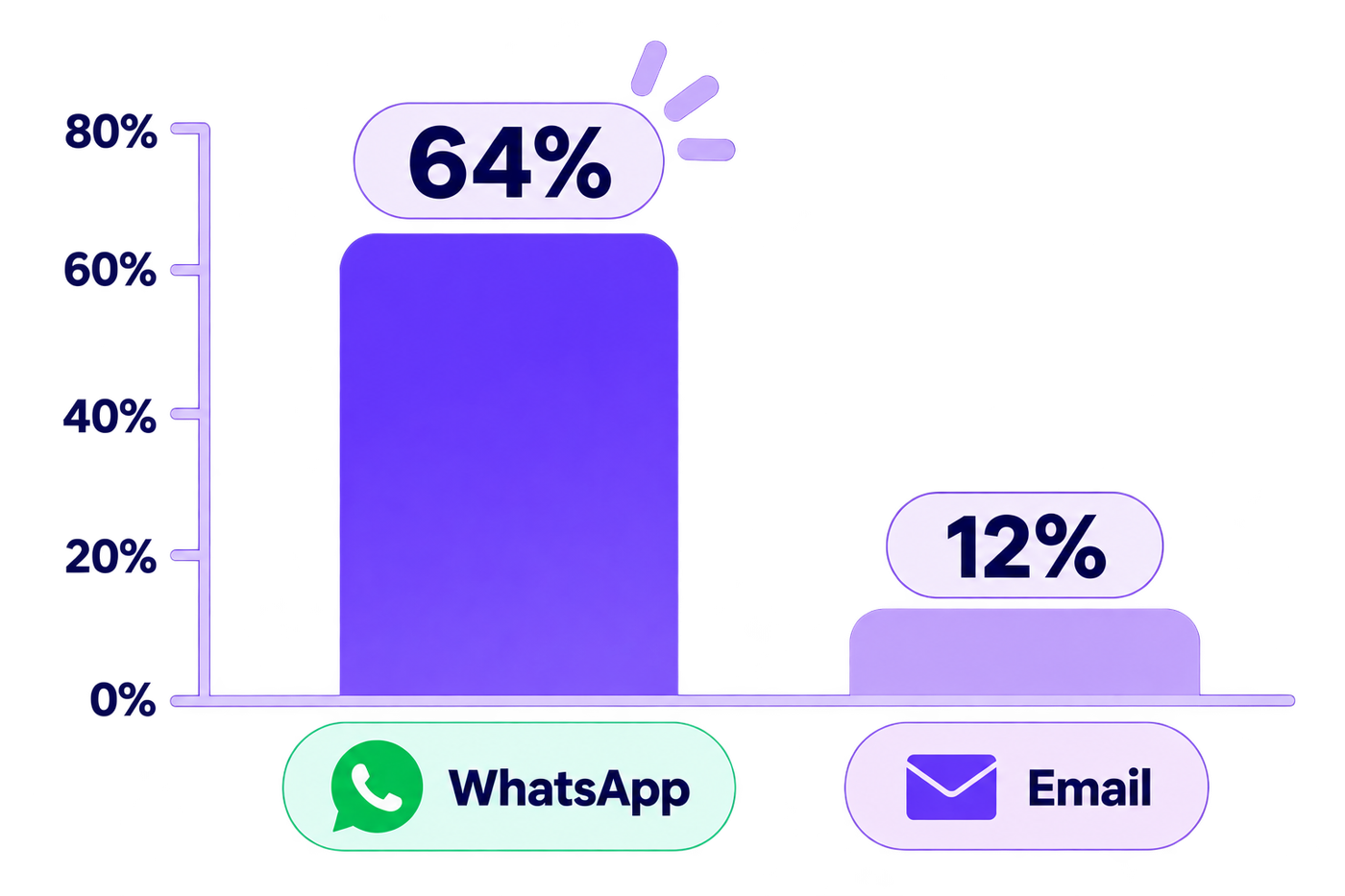
In this data, WhatsApp reaches about five times as many candidates as email.
Check four things in the demo.
- Which channels the tool can use to start and continue a conversation: WhatsApp, voice calls, SMS and email.
- Whether candidates can reply in their own language. HireBound’s Voice AI works in 14 Indian languages, and you should ask any vendor which languages their voice and chat support in practice.
- Whether replies from all channels land in one thread per candidate.
- Whether the tool connects to the job boards your agency already posts on, such as Naukri and Indeed (HireBound has native job portal integrations, with two-way sync with Naukri, Indeed and 12+ boards), which matters for frontline and mid-level roles.
If you place candidates in blue-collar, BPO or retail roles, weight this criterion heavily. If you place senior leaders found through personal networks, it matters much less.
Criterion 3: Can It Run Several Client Mandates Cleanly?
Agency work is organised by mandate, so the software should be too. Look for a separate pipeline for each client role, access controls so one client’s candidates stay out of another’s view, and a clear record of every submission.
Test it with a mixed case. Put one candidate into two mandates for two clients, then ask the vendor to show the history, what each client has seen and who contacted the candidate. If the answer involves a spreadsheet, the tool is built for corporate teams.
Reporting belongs here too. Ask whether a client can see their own pipeline without seeing your other work, and whether revenue is tracked by mandate, with forecast, booked and lost figures in one place.
Criterion 4: How Well Does It Connect to What You Already Use?
Few agencies start from nothing. You probably have a CRM or ATS holding years of candidates, plus calendars, email and job-board accounts. A new tool that cannot work with them forces a migration you may not want.
Ask two questions.
- Does the tool work alongside your existing system, or does it need to replace it? Some products sync two ways with an existing ATS, so you keep your system of record and add automation on top. Ask the vendor to name the systems and workflows supported, since coverage is rarely universal.
- Can you export everything in a usable format if you leave?
Trace one real candidate through the demo, from first contact to booked interview, and watch where a person retypes information. Our post on how a recruiting platform connects your hiring workflow walks through that trace in more detail.
Criterion 5: What Will It Really Cost Over Two Years?
The subscription is rarely the whole bill. Setup, integration, training and admin time add cost, and per-user pricing grows with every recruiter you hire.
For an Indian agency, add two checks. Confirm the quote is in rupees, so a currency move does not change your cost midyear. Confirm whether GST is included, because it changes the figure your finance team approves.
Compare tools on cost per placement over two years, not the monthly fee: divide total two-year cost by the placements you expect to make. Our total cost of ownership guide shows the full model, with a worked example in rupees.
A cheaper tool that leaves more work with recruiters can cost more in recruiter time than it saves on the invoice, so read this criterion next to criterion 1.
Criterion 6: How Does It Handle Candidate Data, and How Do You Leave?
An agency holds a lot of personal data, and the rules are tightening. India’s Digital Personal Data Protection Rules were notified in November 2025, and the Press Information Bureau says they provide an 18-month phased compliance timeline. That timeline puts the main notice and consent obligations in 2027, so any tool you sign now has to work under them.
Ask each vendor four things.
- How is candidate consent captured, and can you show proof of it?
- Can you delete or correct a candidate’s data on request, and how long does it take?
- Where is the data stored, and who can access it?
- What happens to your data and your candidate history if you cancel?
Treat a vague answer to the last question as a warning. This is general information, not legal advice, so check your obligations with counsel.
How Do You Score Vendors? A Worked Exercise
Give each criterion a weight out of 100, score each tool from 1 to 5, multiply, and divide the total by 5 to get a score out of 100.
Every number below is an assumption chosen to show the method, not a measurement of any real product. The two tools are described by type: Tool A is a recruiting CRM with assistive AI features, and Tool B is an agent-led platform that runs outreach, screening and scheduling.
Agency 1 has 25 recruiters, high-volume roles and WhatsApp-led outreach. Agency 2 has 8 recruiters, does senior niche search and is relationship-led. The table gives each agency’s weights and the shared scores.
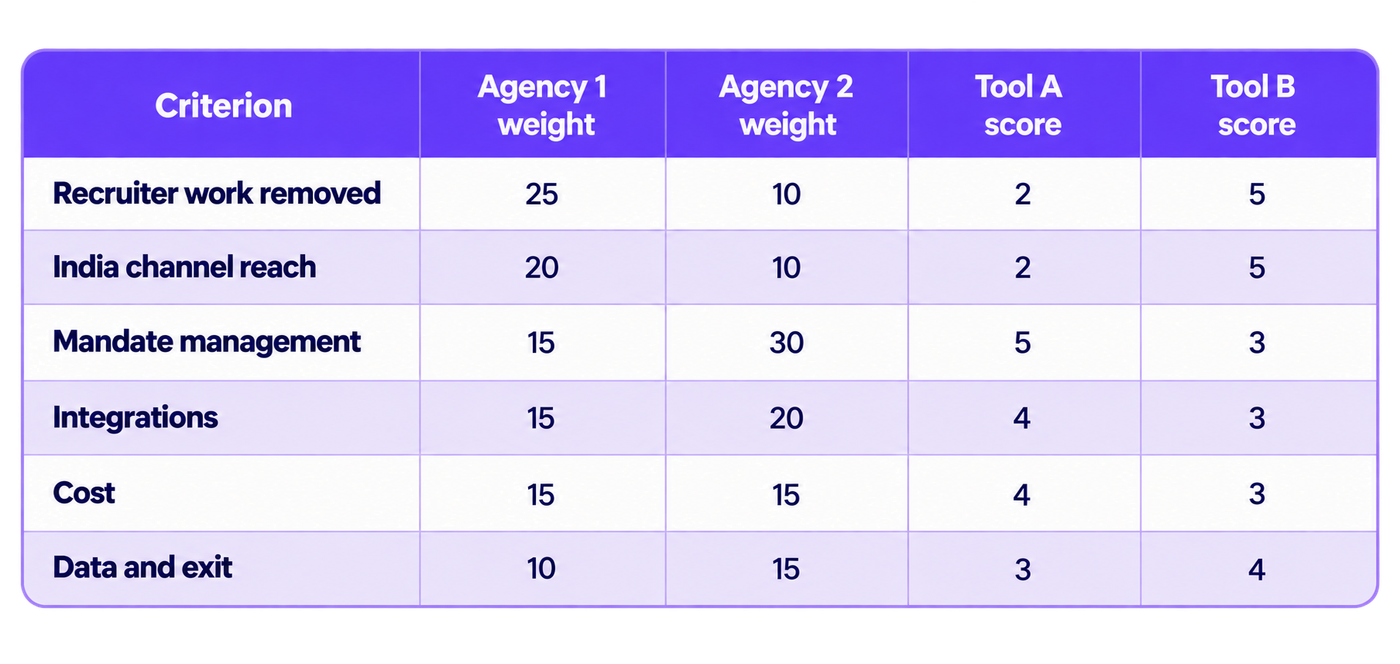
Multiplying each score by its weight for Agency 1 gives Tool A 50 + 40 + 75 + 60 + 60 + 30 = 315, which is 63 out of 100. Tool B gives 125 + 100 + 45 + 45 + 45 + 40 = 400, which is 80. Tool B wins because this agency’s bottleneck is recruiter hours and candidate reach.
For Agency 2, Tool A gives 20 + 20 + 150 + 80 + 60 + 45 = 375, which is 75. Tool B gives 50 + 50 + 90 + 60 + 45 + 60 = 355, which is 71. Tool A wins with the same tools and scores, which is the reason to fix your weights before any demo, and to distrust a comparison that does not say whose weights it used.
Run the exercise yourself with three steps.
- Write your weights first, with the senior partners in the room, and make them total 100.
- Score each tool only after a scripted demo, using the same candidate and mandate for every vendor.
- If the gap is under about 5 points, treat it as a tie and decide on the criteria you weighted highest.
Which Agency Needs Which Kind of Tool?
These scenarios are starting points, not rules.
- Small niche or executive search firm. Relationships drive revenue and volumes are low, so a well-set-up CRM with strong mandate and client views is likely enough. Heavy automation adds cost for work you do not have.
- Agency adding a vertical with an existing ATS. You want to keep the system of record. Prioritise tools that work alongside it, and weigh integration and data export most heavily.
- Mid-size generalist agency growing through new clients. Mandate separation, reporting and cost per placement dominate. Compare total cost carefully, and read our comparison of agency and in-house recruiting if clients are weighing both models.
- Agency filling many roles through multi-channel outreach in India. If your week goes on messaging, screening and chasing interview slots across WhatsApp, calls and email, weigh recruiter work removed and channel reach most heavily. Tools where agents run those stages and a recruiter picks up qualified candidates fit this profile. HireBound is built for it, and 60+ recruiting teams in India already run on it; the scoring exercise above shows whether it fits yours.
What Should You Ask in Every Demo?
Use the same script with every vendor. It keeps the comparison fair.
- Take one of our live mandates and show it from shortlist to booked interview. Which steps need a recruiter?
- Show a candidate who replies in Hindi or another regional language at 9 pm. What happens?
- Put one candidate into two client mandates and show me what each client sees.
- Show me the sync with our current system. What breaks if a field changes?
- Give me the full two-year price in rupees, with GST, setup and training listed.
- Show me how a candidate withdraws consent and how I export all our data.
- Which of these tasks do customers still do by hand, and how often?
Question 7 is the most useful, because a plain answer tells you where the product stops.
Want to test your own mandate against this checklist? Talk to us about running a demo on your roles →
How Should You Decide?
Choose by weights, not by feature count. Write your six weights, score each vendor after the same scripted demo, and check the cost per placement over two years before you decide.
The rule is simple. If most of your recruiters’ week goes on finding, messaging and screening candidates, weigh recruiter work removed and channel reach most heavily. If most of it goes on managing clients and relationships, weigh mandate management and integrations most heavily.
The diagram sums up the rule.
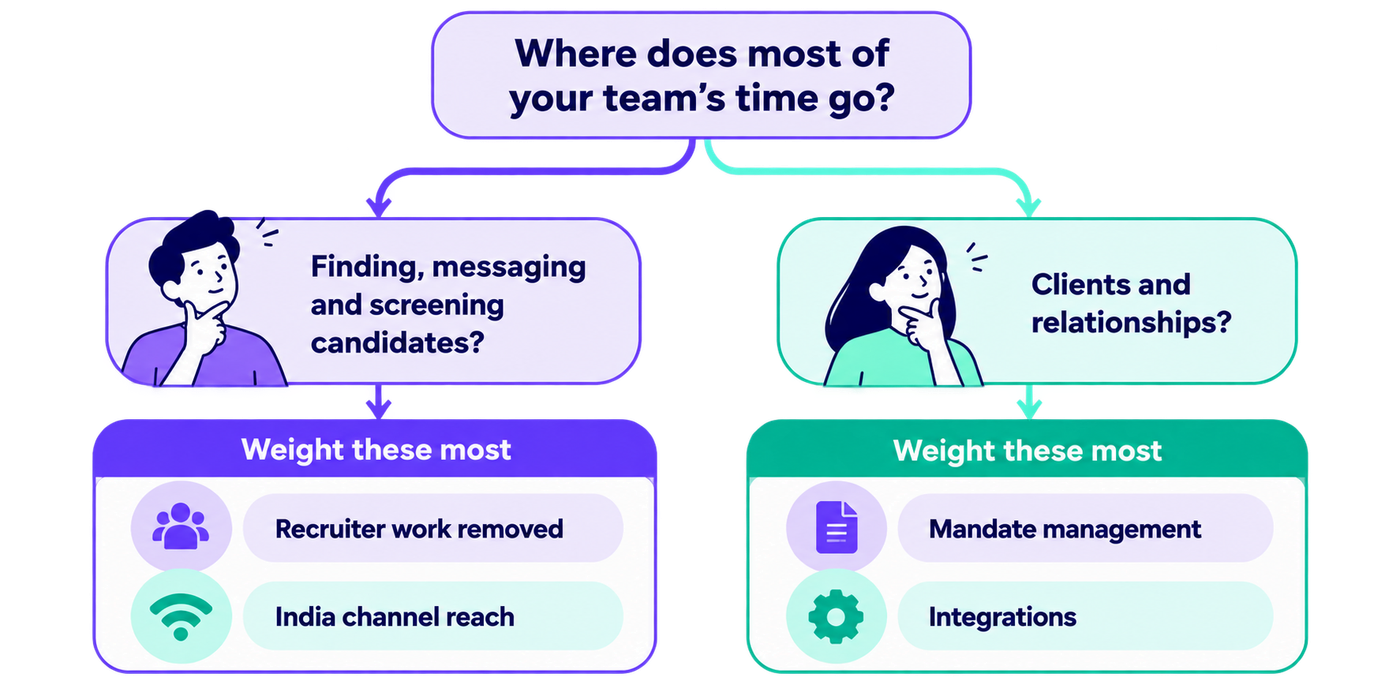
Decide which branch your week sits in before you open any vendor demo.


