Screening Software: What to Look for Before You Choose
 Tanmey Goswami
 ·Oct 23, 2026·8 min read
Key Takeaways
- 1Screening software falls into four types, from keyword filters to conversational agents, and the type decides which criteria matter, so name your job first.
- 2Choose software that lets you set the criteria, shows why each candidate scored as they did, and keeps a recruiter in control of declines.
- 3Check native WhatsApp, voice and regional-language coverage for India, because HireBound data shows a 64% WhatsApp response rate against about 12% for email.
- 4The EU AI Act classes recruitment AI as high-risk and India’s DPDP Act requires consent, so ask vendors how they record consent and audit scores.
- 5Test two or three shortlisted tools on the same 50 candidates, and compare shortlist overlap, recruiter hours and completion rate before you buy.
Screening software, also called candidate screening software, is a tool that collects and scores early-stage candidate information, usually through questions, assessments or conversations, so recruiters can shortlist faster. When you choose one, look at who sets the criteria, how scores are explained, which channels and languages it covers, and where a person can step in.
This guide covers the four types of tool, eight criteria, red flags and a scoring sheet. It is written for TA leads and HR heads who are choosing a tool for a high-volume or multi-role hiring team.
Want screening that scores against your criteria and shows its reasons? See how HireBound works →
What Is Screening Software?
Screening software sits between application and the first recruiter conversation. It decides who is worth that conversation. Tools differ most in how they collect information, and that decides what to check.
The table lists four types and the situation each one suits.
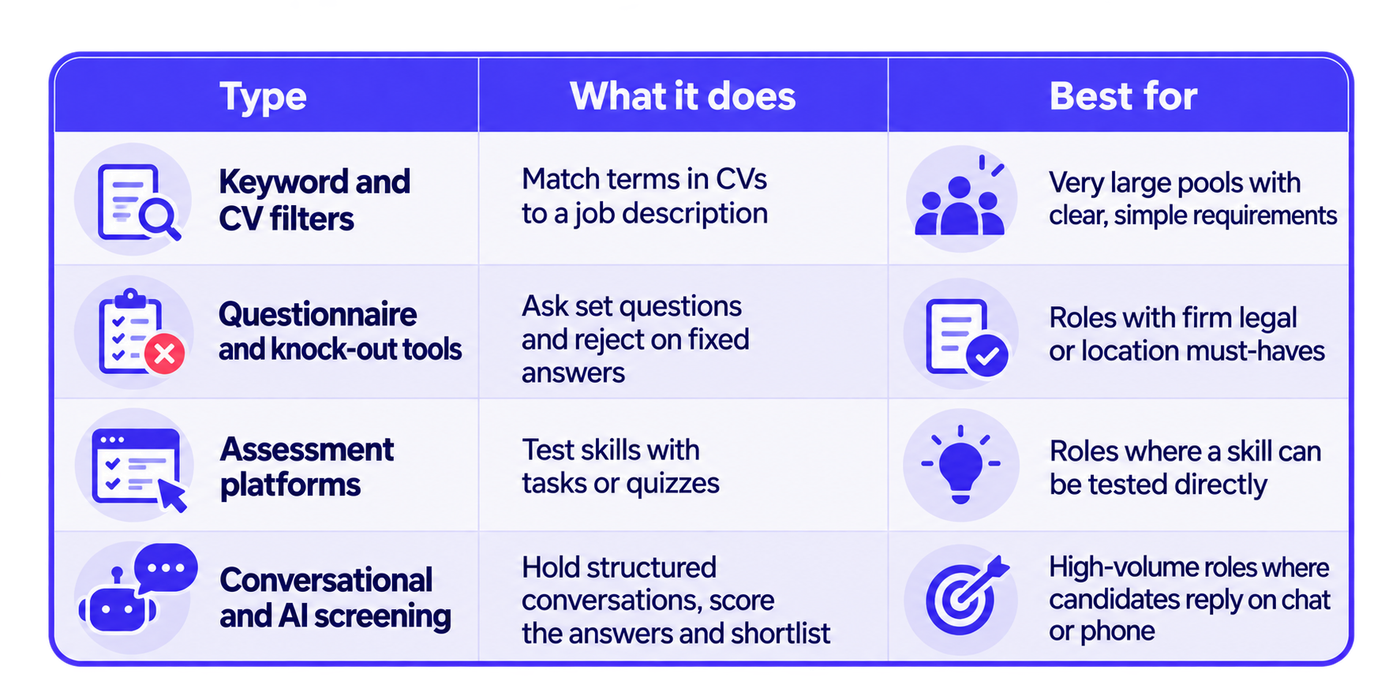
Many products combine types. Name your own use case before you compare vendors, because the right criteria differ for each type.
Which Criteria Matter Most When Choosing Screening Software?
Eight criteria cover most of the decision. The next sections take them in order.
- Control over the criteria.
- Explainable scoring.
- Channel coverage.
- Language coverage.
- Human review and override.
- Bias testing and audit trail.
- Consent and data protection.
- Integration and setup.
Weight them to match your hiring. A team screening thousands of frontline applicants will weight channels and languages heavily. A team hiring a few senior roles will weight explainability and review.
Does the Software Let You Set the Criteria?
The tool should apply your criteria, with no hidden scoring rules. You should be able to write the must-haves, the questions and the scoring rubric, and change them without a support ticket.
Ask these questions:
- Can I write my own questions per role?
- Can I define what a strong answer looks like?
- Can I set thresholds, and change them later?
- Can two roles use different criteria?
Sackett, Zhang, Berry and Lievens report a mean validity of .42 for structured interviews and .19 for unstructured ones in the Journal of Applied Psychology (Sackett et al., 2022). That supports fixed, job-related questions, so check that the tool lets you set them.
Can You See Why a Candidate Scored the Way They Did?
A score without reasons is hard to trust and hard to challenge. For each candidate, you should see the answers, the score on each criterion and a plain-language reason.
Look for these outputs:
- The recording or transcript of the screen.
- A score per criterion as well as an overall number.
- A short reason a recruiter can read in seconds.
- A log of who or what changed the outcome.
Ask the vendor to show a borderline candidate on screen, and explain the score. If it cannot, the tool will be hard to defend to a hiring manager.
Which Channels and Languages Does It Cover?
Channel and language decide how many candidates complete the screen. List where your candidates reply, and check each channel works natively in a live account.
Check these in particular:
- Voice, WhatsApp, SMS and email. Ask for each to be shown, not described.
- One thread. Replies from every channel should land in one candidate record.
- Regional languages. Ask which languages the screen supports in both speech and text.
HireBound data shows a 64% WhatsApp response rate in India, compared with about 12% for email. A tool built around email alone may reach only part of an Indian candidate pool. Our guide to WhatsApp recruiting covers opt-in, timing and message design.
The infographic below shows a coverage checklist you can take into a demo.
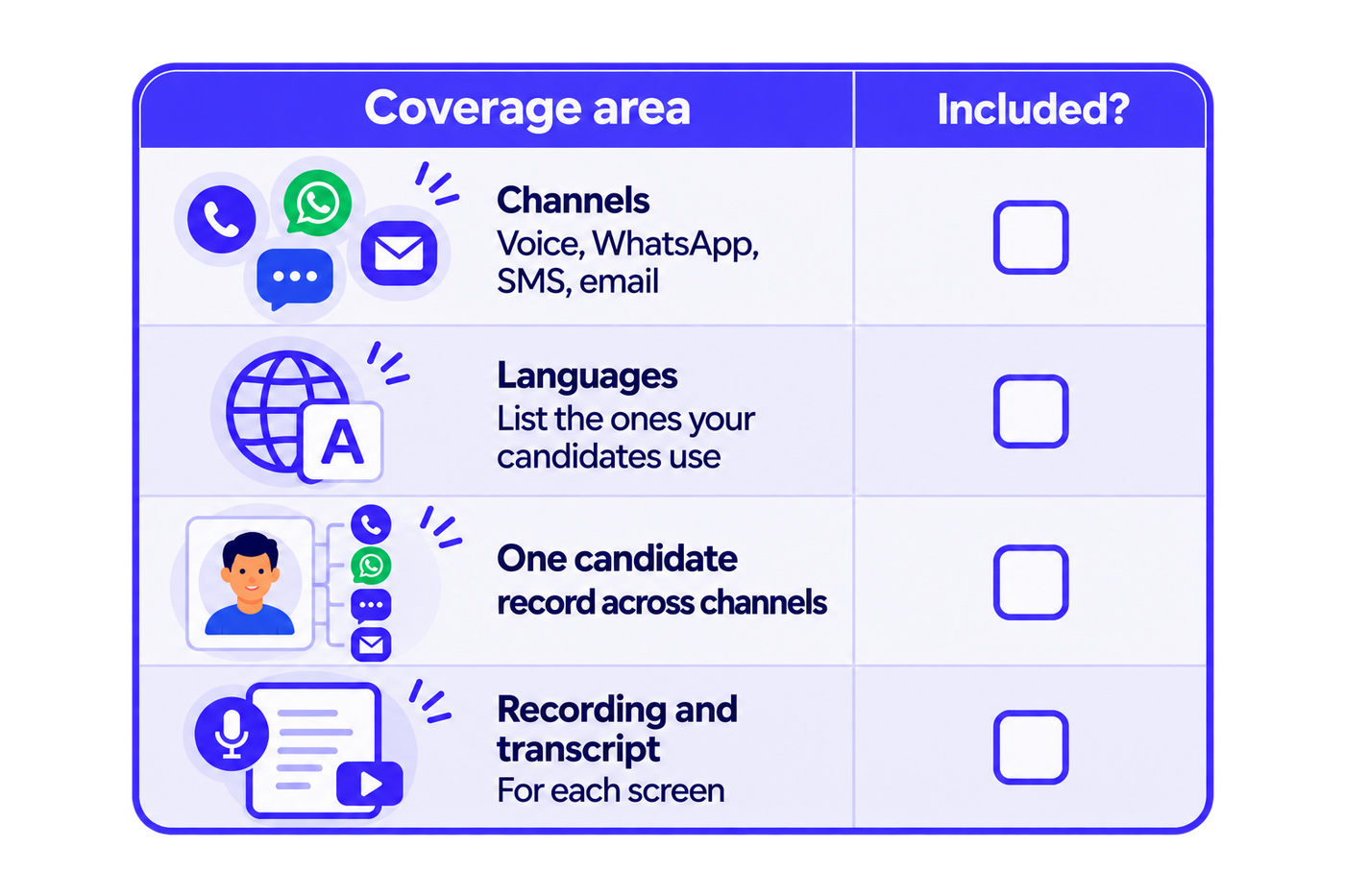
Ask the vendor to show each row live, in a test account, using your own candidates’ languages.
Where Do Humans Step In?
Good software makes it easy for a person to check and change an outcome. The tool should route uncertain cases to a recruiter and let a human override any decision.
Look for these controls:
- A review queue for borderline scores, with the evidence beside each candidate.
- A sample of declines a recruiter can check weekly.
- An override that records who changed the outcome and why.
- Rules that stop automatic rejection on a single answer.
A tool that rejects people with no person in the loop is hard to defend. Our guide on how to automate candidate screening shows where to place these checkpoints.
How Does It Handle Bias, Consent and Data Protection?
Ask every vendor to explain how it tests for bias, how it records consent and what it stores. These answers matter to regulators and to candidates.
The EU AI Act classifies recruitment and candidate-evaluation systems as high-risk. Under Article 99, breaches of the high-risk obligations can bring fines of up to €15 million or 3% of worldwide annual turnover, whichever is higher. If you hire in India, our guide to AI hiring laws in India covers the rules that apply to you.
India’s Digital Personal Data Protection Act, 2023 requires consent, or another use the Act specifically permits, before personal data is processed. The DPDP Rules, 2025 were notified in November 2025, with most obligations phased in over 18 months.
Ask these questions:
- How do you test scores for differences by group, and how often?
- How is consent captured and stored for each channel?
- Where is candidate data stored, and for how long?
- Can I export or delete a candidate’s record on request?
The infographic below turns these into a question card for the demo.
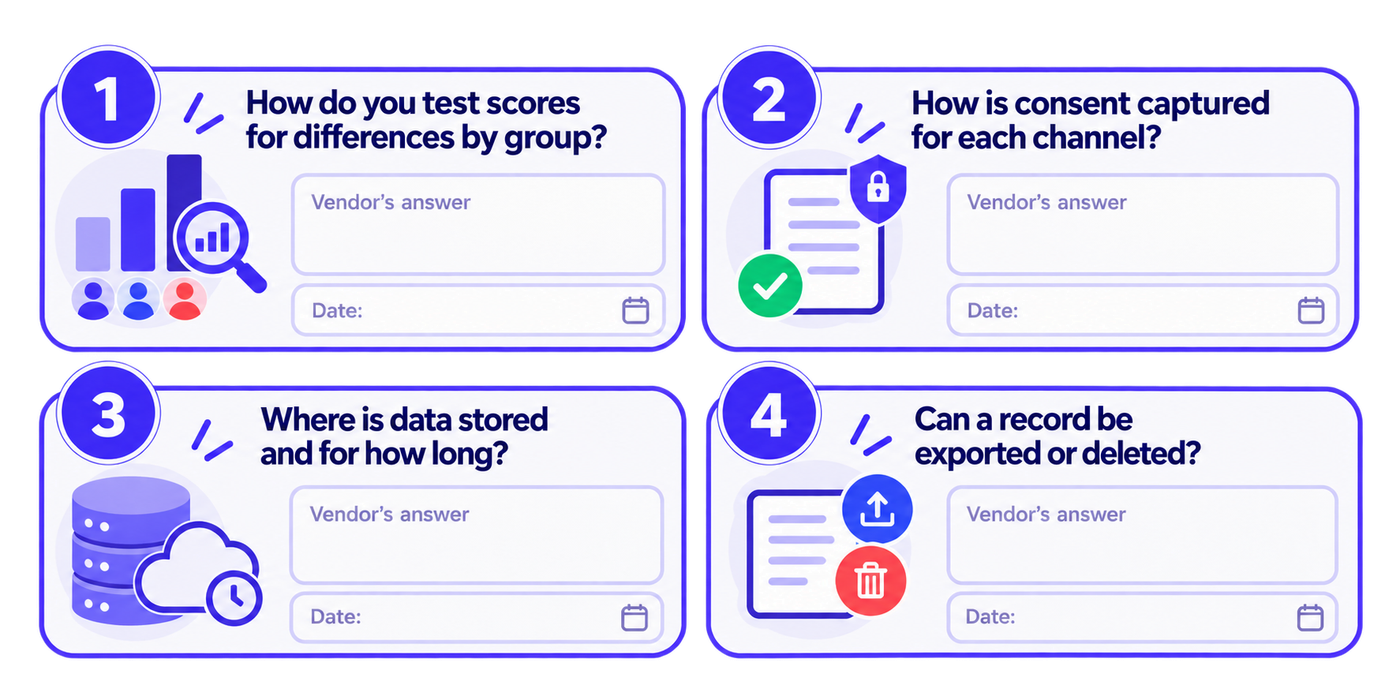
Write down each answer and the date, so you can compare vendors afterwards.
How Does It Connect to Your ATS and Workflow?
Screening software should fit into the system you already use. A tool that creates a second record for each candidate adds work instead of removing it.
Check whether it syncs stages and results to your ATS, whether recruiter actions update the same record, and whether the migration falls on your team. Our post on how a recruiting platform connects your hiring workflow explains why a single candidate record matters.
HireBound is built to automate the manual work around an existing ATS, so a team can keep its system of record and add screening on top.
Also ask who does the setup, how long a pilot takes to launch, and what support covers after go-live. Get the answers in writing, because setup effort is a real cost that does not appear in a demo.
Who Should Be on the Evaluation Team?
A screening tool touches several teams, so involve them before the demo, not after. Five roles cover most of the decision.
- A TA lead owns the outcome and the criteria.
- Two or three recruiters use the tool daily and judge the workflow.
- A hiring manager checks that shortlists match what the role needs.
- IT or security reviews data storage, access and integration.
- Legal or a data protection lead reviews consent, retention and bias controls.
Give each person the same scoring sheet, and have them score separately before you compare. That stops the loudest voice in the room from deciding.
Which Requests Should You Make in the Demo?
A demo shows the best case, so ask the vendor to show your case. Eight requests keep it honest.
- Build a screening set for one of your real roles, live.
- Run a screen in two of your candidates’ languages.
- Show a borderline candidate and explain the score.
- Show the review queue and an override with its log.
- Show consent being captured on each channel.
- Export a candidate record.
- Show the ATS sync with your system.
- Show what a candidate sees on a basic phone.
A vendor that can do all eight in one session can usually back its claims.
How Should You Score and Test Vendors?
Score every vendor on the same sheet, and test the finalists on real candidates. A weighted sheet turns opinions into comparable numbers.
The table shows an example. The weights are illustrative, so change them to match your hiring.
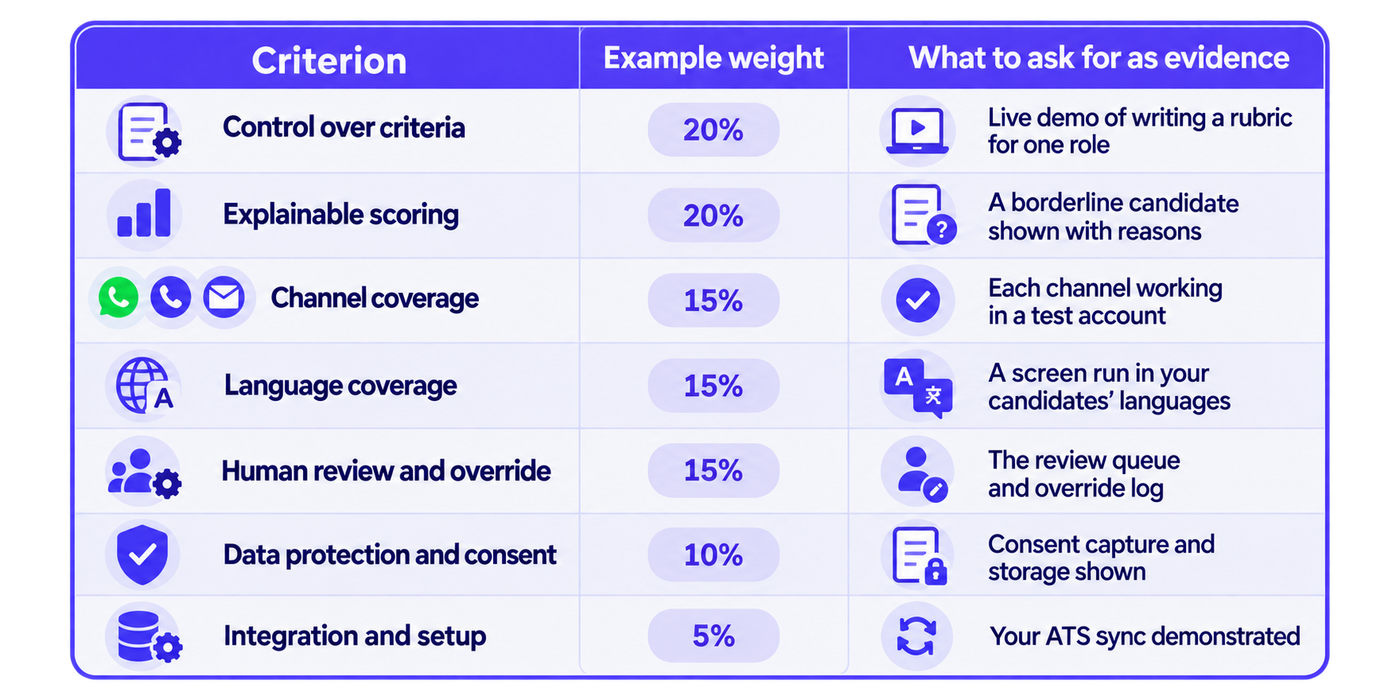
Then run a test. Give two or three finalists the same 50 real candidates and the same criteria for two weeks. Compare:
- Overlap between each tool’s shortlist and your recruiters’ own shortlist.
- Recruiter hours spent per shortlisted candidate.
- Completion rate by channel.
- How many borderline cases the tool routed to a person.
If a tool does not beat your manual baseline on at least two of these, do not buy it.
What Red Flags Should You Watch For?
Some answers should slow your decision. Six red flags are worth watching.
- Scores with no reasons or evidence.
- Automatic rejection with no human review.
- Claims that the tool is “bias-free” with no testing method.
- One channel only, when your candidates reply elsewhere.
- No export of candidate data.
- Vague answers on consent and storage.
Treat any one of these as a reason to ask follow-up questions, and several together as a reason to drop the vendor from the shortlist. A vendor that answers plainly is easier to trust than one that answers yes to everything. For a wider list of questions across AI recruiting platforms, see our AI recruiting platform checklist.
Where Does HireBound Fit?
HireBound’s Screening Agent holds structured, role-specific conversations over Voice, WhatsApp and Email, in multiple languages, and scores and shortlists candidates against the criteria you set. It keeps the recording and transcript with the candidate record, and recruiters review the output and make the hiring decision. Voice AI works in 14 Indian languages.
HireBound has powered 8 million+ candidate conversations, and 60+ recruiting teams in India run on the platform. Recruiters using HireBound handle 3× more candidates per day than with a manual process.
Want to run your 50-candidate test with HireBound? Talk to HireBound about a pilot →
Conclusion: A Decision Rule for Choosing Screening Software
Name your use case, weight the eight criteria, and test the finalists on the same candidates. Choose the tool that lets you set the criteria, explains its scores and keeps a recruiter in control.
Write your decision rule before the demos start, so the test decides the choice.
Apply one rule. If most of your recruiters’ week goes on asking the same first questions of many candidates in several languages, weigh channel coverage, language coverage and explainable scoring most heavily. If most of it goes on rare senior hires, weigh review and integration most heavily.


